HomeWorkspaceHistoryToolsSkillsFavoritesPrompts

More from FilmLune

    MCP server
Use the arrow keys in 16-pixel steps, Shift for 48 pixels, and Home or End for the limits. Double-click to reset.
HomeHistoryToolsFavorites

Your privacy.FilmLune loads neither audience measurement nor optional third-party content before you choose. Necessary sign-in security verification remains separate.

    HomeWorkspaceHistoryToolsSkillsFavoritesPrompts

More from FilmLune

    MCP server
Use the arrow keys in 16-pixel steps, Shift for 48 pixels, and Home or End for the limits. Double-click to reset.

FilmLune · AI generator and gallery

Curated prompts | Create AI images & videos with easeCreate AI images & videos

Aauqib@auqibhabib
Aauqib@auqibhabib
BBubbleBrain@BubbleBrain
HHeisenberg@rovvmut_
ᴍᴍᴜʀᴘʜʏ@Diplomeme
HHarboris@harboriis
OOogie@oggii_0
TTaaruk@Taaruk_
AAqsa@Aqsahere_
Ssimeon-sanai@Naiknelofar788
ᴍᴍᴜʀᴘʜʏ@Diplomeme
HHarboris@harboriis
ᴍᴍᴜʀᴘʜʏ@Diplomeme
TTaaruk@Taaruk_
EEmma@Emmma__0
DDuet | AI@Sheldon056
NNoor@noorlewisx
SSaul Goodman@Goodmanprotocol
CCellier@cellier_
Ddreamy digital arts@dreamydigiarts
AAijaz@iamsofiaijaz
ZZara@ZaraIrahh
PPrompt アトリエ|AI画像プロンプト@CyberTotal2026
MMelis✨@miilesus
MMira@miratechtool
𝗦𝗦𝗮𝗻𝗶𝗮@saniaspeaks_
BBubbleBrain@BubbleBrain
TTaaruk@Taaruk_
TTaaruk@Taaruk_
MMr Gafish | 鱼哥@MrGafish
AAyyoub Ai@MaAyyoub
MMimu | AI Tools & News@mimu_ai1
Ddreamy digital arts@dreamydigiarts
𝑨𝑨𝒇𝒓𝒊𝒏@afrinxai
MMaercih@Maercihh
AAniya Intelligence@aniyaintel
WWeWant Mars@Madhuribhai
Ddreamy digital arts@dreamydigiarts
ZZayan@HustleXR
ZZephyra Leigh@ZephyraLeigh
ZZyrella@Zyrellix
Ddreamy digital arts@dreamydigiarts
𝑨𝑨𝒇𝒓𝒊𝒏@afrinxai
LLarus Canus@MrLarus
Ddreamy digital arts@dreamydigiarts
EElvorya@Elvorya
ZZayan@HustleXR
AAynelle@aynellex
GGilbert Odera | Your AI Plug@yourPlugAI
WWeWant Mars@Madhuribhai
PPicts by AI@pictsbyai
𝑨𝑨𝒇𝒓𝒊𝒏@afrinxai
AAyat@aiwithaayat
Ssimeon-sanai@Naiknelofar788
MMahnoor Fatima@MahnoorAi12
SSairah@Sairah_0
AAqsa@Aqsahere_
AAi Bella@zahra4sure
MMaya@Mayaahh_h
LLarus Canus@MrLarus
SSnow@iamrealsnow
NNoor@noorlewisx
WWania@AIwithWania
TTechieSA@TechieBySA
HHarboris@harboriis
SSarmad Tahir@itxsarmadd
SSarah@SyntheSarah
TTechieSA@TechieBySA
Uunderwood@underwoodxie96
SShahid Wani@meng_dagg695
LLoriel.AI@ou_zhen599
NNoor@noorlewisx
ᴍᴍᴜʀᴘʜʏ@Diplomeme
Ssimeon-sanai@Naiknelofar788
SSophia@sophiaparkerr_
TTaaruk@Taaruk_
Ssimeon-sanai@Naiknelofar788
YYaseen Khan Gul@YaseenK7212
DDuet | AI@Sheldon056
Sserein@you1873118
TTaaruk@Taaruk_
Ssimeon-sanai@Naiknelofar788
ZZephyra Leigh@ZephyraLeigh
Aauqib@auqibhabib
李李岳@liyue_ai
𝗦𝗦𝗮𝗻𝗶𝗮@saniaspeaks_
NNancy Diazz@Nancy__Diazz
HHarboris@harboriis
Aauqib@auqibhabib
CCherry@hey_am_cherry
CChristopher Fryant@cfryant
ししらき@パワポ図解@kumiko_shiraki
𝑨𝑨𝒇𝒓𝒊𝒏@afrinxai
ZZeeshi@AIwithZeeshi
RRuby Ai@HeyRu0by
WWasifAI@doctorwasif
おおのふみ| 3D×動画生成×個人開発@onofumi_AI
SSmiling Khan@AIwithkhan
LLudovicCreator@LudovicCreator
DDAAI@daaihq
SSairah@Sairah_0
Lliana@Lianaalane
KKiki@Mayz1169
MMichael Rabone@michaelrabone
LLavinia@laviniavelle
MMichael Rabone@michaelrabone
ΛΛRMIN@Arminn_Ai
SSaul Goodman@Goodmanprotocol
CCiri@Ciri_ai
MMarcio Lima 利真 マルシオ 💎@Preda2005
AAlexandra Aisling@AllaAisling
MMichael Rabone@michaelrabone
LLoriel.AI@ou_zhen599
MM-studioAi@Strength04_X
OOrion@Prime_54
Ssimeon-sanai@Naiknelofar788
ZZayan@HustleXR
Explore by format
AI image examples ↗AI video examples ↗

Understand FilmLune

FilmLune at a glance

FilmLune combines an AI image generator with a gallery of image and video examples. Each detail shows the result, available prompt, declared model, and a method you can adapt.

Explore all prompts ↗

A readable method

From an example to a prompt, then Studio

  1. Choose an example that matches your creative intent.
  2. Open its detail to read the complete prompt and the real order of steps.
  3. Send the recipe to the compatible Studio, adjust it, then create your own result.

Two ways in

Choose image or video

Start with an image example for a still composition, or a video example to study motion, inputs, and duration. Both libraries lead to the same canonical case details.

View image promptsView video prompts

Useful boundaries

Models, sources, and trust

Models and settings describe the visible revision: FilmLune does not silently replace a model during handoff. External work keeps its attribution and source link on the detail page.

Can I copy every prompt?

Only when that revision’s rights permit it. The detail then preserves the prompt and its provenance; an unavailable action is never replaced with invented content.

Will the result be identical?

No. Model versions, inputs, and settings can change the output. Use the method as a starting point and check the parameters before generating.
FilmLune

From real examples to AI image and video creation.

Models

Image models

  • GPT Image 2
  • GPT Image 2.5
  • Midjourney V8.1
  • Midjourney V8.2
  • Nano Banana 2
  • Nano Banana Pro

Video models

  • MiniMax H3
  • Seedance 2.0
  • Seedance 2.5
  • Dola AI alternative

Resources

  • All resources
  • Changelog

Create

  • Open Studio

Tools & Skills

  • Explore tools
  • Explore skills
  • MCP server

Community

  • Follow FilmLune on X ↗
  • Join Discord ↗

Prompts

  • Explore prompts
  • Image prompts
  • Video prompts

FilmLune

  • Contact
  • Pricing

Legal and privacy

  • Privacy Policy
  • GDPR
  • CCPA
  • Cookie choices
  • Sharing rules

© FilmLuneKeep creative work and trustworthy information close at hand.

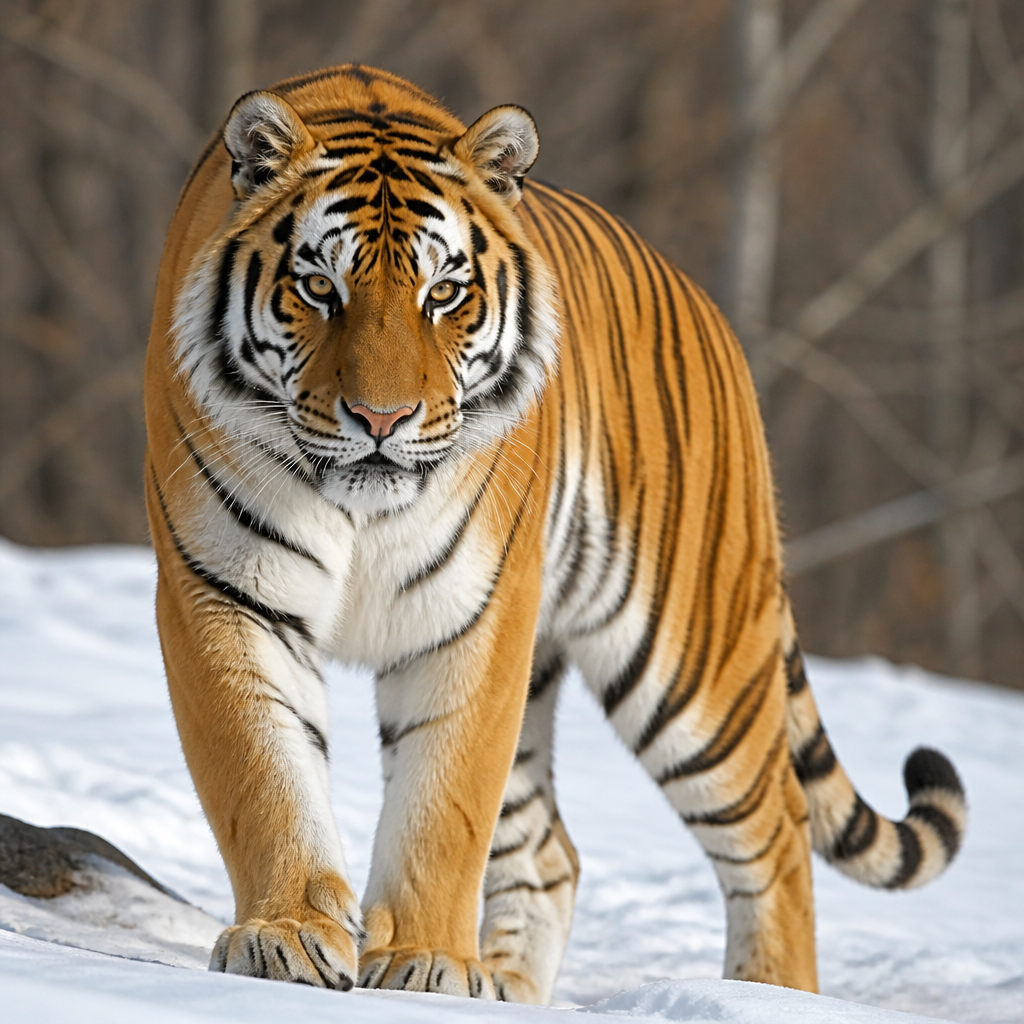
Square-format generated image of a tiger
Avatar of F YF YGPT Image 2

PROMPT
一只老虎

Square-format generated image of a tiger

A minimalist prompt asking simply for "a tiger", generated as a still image in 1:1 format with GPT Image 2. Because the prompt carries almost no direction, the result relies entirely on the model's own interpretation.

Image prompts and examples

When to use this

Produce a tiger image quickly with no constraints on style, setting, or composition. A prompt this short works well as a capability test, a generic visual to refine later, or a starting point for iterating toward a more specific look.

How to recreate it

The generation uses a single phrase: "一只老虎", meaning "a tiger". No pose, background, lighting, or style is specified, so the model decides those elements freely. The 1:1 format produces a balanced square frame suited to social feeds or thumbnails. To reproduce the approach, enter a similarly brief description in GPT Image 2 while keeping the 1:1 ratio, then review the output. To push the result further, enrich the prompt step by step: first specify the tiger's attitude (walking, looking at the camera, resting), then the setting (jungle, snow, studio), and finally the visual treatment (realistic photography, illustration, watercolor).

Practical adjustments

  • Add a style or lighting cue to the prompt to reduce randomness between generations.
  • The square format suits a centered animal subject: place the tiger in the middle of the frame for maximum impact.
  • Generate several variations with the same prompt to compare the model's interpretations before refining.

Limitations

With such a short prompt, pose, setting, lighting mood, and style are uncontrolled and can vary sharply from one render to the next. The 1:1 frame may crop wide environments such as a savanna or an extended forest. No text or brand elements can be added reliably without expanding the prompt.

HomeHistoryToolsFavorites