
FilmLune · création et galerie IA
Prompts sélectionnés | Créez facilement des images et vidéos IA
Comprendre FilmLune
FilmLune réunit un générateur d’images IA et une galerie d’exemples image et vidéo. Chaque fiche présente le résultat, le prompt disponible, le modèle déclaré et une méthode à adapter.
Explorer tous les promptsUne méthode lisible
Deux points d’entrée
Partez d’un exemple image pour travailler une composition fixe, ou d’un exemple vidéo pour étudier le mouvement, les entrées et la durée. Chaque bibliothèque renvoie vers les mêmes fiches canoniques.
Repères utiles
Les modèles et réglages décrivent la révision visible : FilmLune ne remplace pas silencieusement le modèle pendant le transfert. Une œuvre externe conserve son attribution et son lien source sur sa fiche.
Seulement lorsque les droits de la révision le permettent. La fiche conserve alors le prompt et sa provenance ; une action indisponible n’est pas remplacée par un faux contenu.
Non. Une version de modèle, une entrée ou un réglage peuvent modifier le rendu. Utilisez la méthode comme point de départ et vérifiez les paramètres avant de générer.
 SpringWangGPT Image 2.5
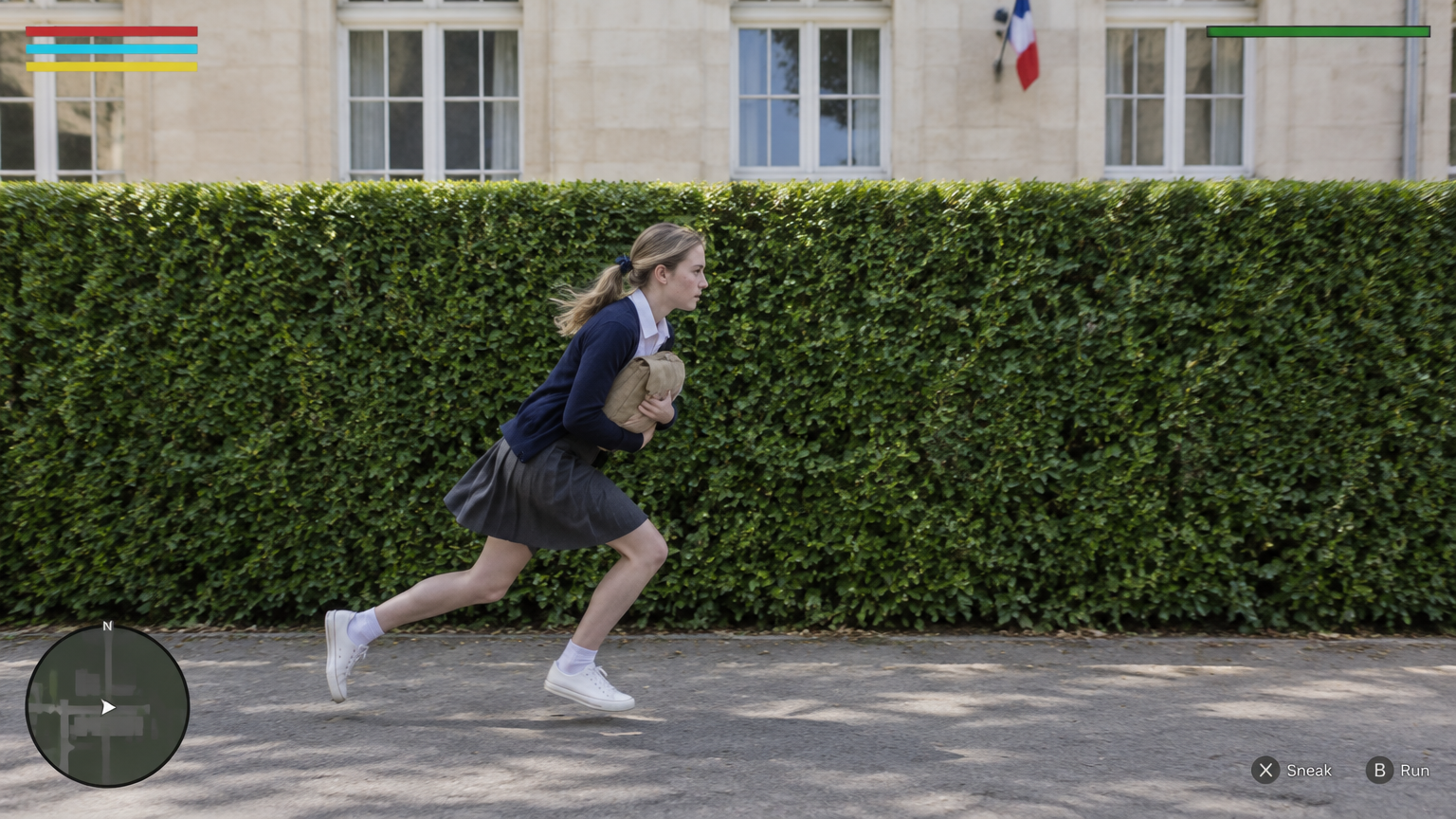
@Create image Create ONE final 16:9 landscape image as the exact opening frame of a photorealistic third-person stealth-game comedy set at a fictional bilingual lycée in France.
The image looks like real live-action footage with a restrained video-game HUD composited over it. Real people, real fabric, real plants and real architecture. Not an illustration, not anime, not a plastic-looking game render.
MOST IMPORTANT — CAMERA AND HEDGE GEOMETRY
The camera looks straight at the LONG FLAT SIDE of a tall, neatly trimmed rectangular hedge.
The camera’s image plane is approximately PARALLEL to the hedge’s long face. The hedge extends horizontally from the left edge to the right edge of the image. Its top edge and lower boundary are almost horizontal.
This is a broadside view across the path, NOT an oblique view looking along the hedge toward a doorway.
The paved path also runs horizontally from screen-left to screen-right, between the camera and the hedge. The school façade behind the hedge is approximately parallel to the hedge and the image plane.
Do not create a diagonal hedge receding into the distance. Do not create a strong vanishing point leading toward an entrance.
OPENING-FRAME OCCLUSION
The hedge’s right-hand END, the school corridor entrance and the principal standing at that entrance are all just BEYOND THE RIGHT EDGE of this first frame.
None of them is visible yet.
The first image must not reveal the doorway, the corridor interior, the principal or a clear gap through the hedge.
Their reveal happens later when the video camera tracks right with the student.
COMPOSITION
The hedge forms a broad, continuous green backdrop across almost the entire frame. Its top sits approximately one-third of the way down the image.
Above it, show a narrow band of pale limestone school façade and white-framed windows. A small French tricolour flag may appear high on the façade, but do not change the camera angle to showcase French architecture.
A narrow strip of paved ground occupies the bottom of the frame.
Place CHLOE in the lower centre-left, running toward screen-right. Keep her complete figure, including both sneakers, inside the image. Her lowered running figure occupies approximately half the image height.
This is a medium-wide gameplay frame, not a fashion portrait or close-up.
MAIN CHARACTER
CHLOE is an 18-year-old adult French female student with fair skin, faint freckles and dark-blonde hair tied into a low ponytail with a small navy ribbon.
She wears an ivory collared blouse, an open navy cardigan, a charcoal-grey knee-length pleated skirt, white ankle socks and white low-top sneakers.
She holds a small tan canvas school satchel tightly against her chest with both arms.
POSE — LOW RUNNING STRIDE
Capture her already moving quickly from left to right.
Her torso leans forward, her hips stay low, both knees are bent, one leg pushes off behind her and the other reaches forward. Her head stays clearly below the hedge’s top edge.
Her face is seen in a natural right-facing profile. She looks ahead along her route, not at the camera and not back over her shoulder.
Her ponytail and skirt trail slightly with the movement. The pose feels furtive, urgent and purposeful, not like upright jogging or a posed sprint.
LIGHT AND REALISM
Bright, natural morning daylight. Rich green foliage, luminous pale stone, believable skin tones and softly filled shadows.
Keep her profile, clothing and hands readable. Natural fabric folds, real leaf texture, grounded foot shadows and only subtle movement in the hair and skirt.
No dark cinematic grading, heavy motion blur, exaggerated depth of field or overexposed highlights.
GAME HUD
A small, clean, flat interface fixed to the screen:
- Top-left: three slim horizontal bars in red, cyan and yellow.
- Top-right: a thin green alert-state bar.
- Bottom-left: a small circular minimap with a white player arrow.
- Bottom-right: muted controller-button prompts.
Leave room beneath the top-left bars for later mission notifications.
No active alert, floating exclamation marker or yellow detection cone in this first frame.
EXCLUSIONS
No visible doorway or teacher in the first frame.
No diagonal view down the hedge.
No portrait pose or eye contact with the camera.
No additional character.
No video-player controls, progress bar, timestamp, play button, edit button, upload button, watermark or platform branding.
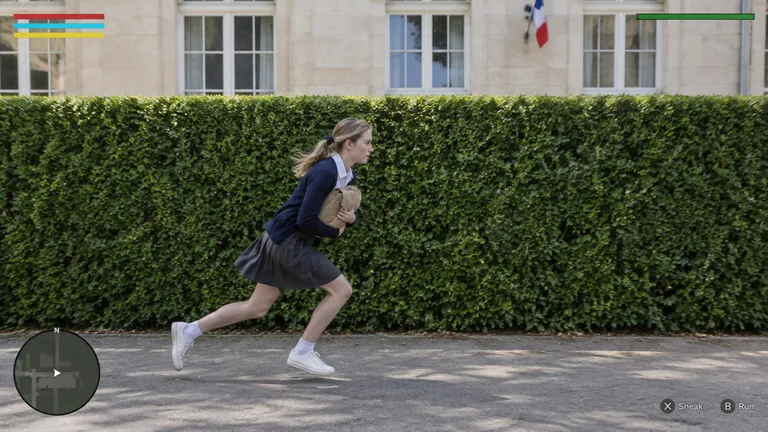
Output one complete image only.Recette pour générer une seule image au format 16:9 avec GPT Image 2.5 : le plan d'ouverture d'un jeu d'infiltration en vue troisième personne, photoréaliste, se déroulant dans un lycée bilingue fictif en France. Une lycéenne de dix-huit ans court de gauche à droite devant une longue haie parfaitement rectangulaire, avec une interface de jeu discrète incrustée à l'écran.
Prompts et exemples d’imagesL'objectif de la recette est de produire une image de première scène crédible qui ressemble à une capture d'un jeu vidéo en prises de vues réelles, sans être une illustration ni un rendu 3D plastique. Le cadre sert de point de départ narratif : la haie, l'entrée du couloir, la principale et l'extrémité droite de la haie sont volontairement situés juste hors champ, à droite, afin d'être révélés plus tard lors d'un travelling vers la droite. Le cadrage doit donc rester strictement frontal et parallèle au visage long de la haie, sans fuite diagonale ni point de fuite marqué vers une entrée.
Commencez par décrire la géométrie : la caméra fait face au côté long et plat d'une haie rectangulaire taillée, dont le plan est parallèle à celui de l'image ; la haie traverse horizontalement le cadre de gauche à droite, avec un bord supérieur presque horizontal. Un chemin pavé court horizontalement entre la caméra et la haie, et la façade de pierre pâle du lycée se situe derrière, parallèle elle aussi. Placez ensuite Chloé, lycéenne française adulte de dix-huit ans, peau claire avec quelques taches de rousseur, cheveux blond foncé attachés en queue basse par un petit ruban marine. Elle porte une blouse ivoire à col, un cardigan marine ouvert, une jupe plissée gris anthracide longue au genou, des chaussettes blanches et des baskets basses blanches, et serre contre sa poitrine un petit cartable en toile beige avec les deux bras. Décrivez la pose : foulée basse déjà engagée vers la droite, torse penché en avant, genoux fléchis, une jambe qui pousse derrière et l'autre qui tend devant, tête nettement sous le sommet de la haie, visage de profil droit regardant devant elle, queue de cheval et jupe légèrement entraînées par le mouvement. Précisez la lumière : matin lumineux et naturel, feuillage vert riche, pierre pâle lumineuse, tons de peau crédibles, ombres douces au sol, sans étalonnage sombre, flou de mouvement marqué ni surexposition. Ajoutez enfin l'interface de jeu plate et discrète : trois fines barres horizontales rouge, cyan et jaune en haut à gauche avec de l'espace en dessous pour de futures notifications, une fine barre d'état d'alerte verte en haut à droite, une mini-carte circulaire avec une flèche blanche en bas à gauche, et des touches de manette discret en bas à droite. Demandez une seule image complète au format 16:9 et rappelez les exclusions : pas de porte, pas d'adulte, pas de personnage supplémentaire, pas de regard caméra, pas de marque de plateforme ni de contrôles de lecteur.
Généré avec GPT Image 2.5 en format 16:9 ; il s'agit d'une image fixe, sans durée ni mouvement, le travelling vers la droite devant être réalisé dans des générations ultérieures. Les modèles d'image placent parfois malgré tout un point de fuite ou laissent apparaître le bout de la haie : plusieurs essais peuvent être nécessaires. La pose de course basse et le profil strict ne sont pas garantis à chaque génération, et la position exacte des éléments d'interface peut varier légèrement d'un essai à l'autre.
 SpringWang
 SpringWang
 SpringWang
 SpringWang
 汪三春
汪三春 汪三春
汪三春 SpringWang
 SpringWang
 SpringWang
 SpringWang
 SpringWang
 SpringWangSpringWangGPT Image 2.5
@Create image Create ONE final 16:9 landscape image as the exact opening frame of a photorealistic third-person stealth-game comedy set at a fictional bilingual lycée in France.
The image looks like real live-action footage with a restrained video-game HUD composited over it. Real people, real fabric, real plants and real architecture. Not an illustration, not anime, not a plastic-looking game render.
MOST IMPORTANT — CAMERA AND HEDGE GEOMETRY
The camera looks straight at the LONG FLAT SIDE of a tall, neatly trimmed rectangular hedge.
The camera’s image plane is approximately PARALLEL to the hedge’s long face. The hedge extends horizontally from the left edge to the right edge of the image. Its top edge and lower boundary are almost horizontal.
This is a broadside view across the path, NOT an oblique view looking along the hedge toward a doorway.
The paved path also runs horizontally from screen-left to screen-right, between the camera and the hedge. The school façade behind the hedge is approximately parallel to the hedge and the image plane.
Do not create a diagonal hedge receding into the distance. Do not create a strong vanishing point leading toward an entrance.
OPENING-FRAME OCCLUSION
The hedge’s right-hand END, the school corridor entrance and the principal standing at that entrance are all just BEYOND THE RIGHT EDGE of this first frame.
None of them is visible yet.
The first image must not reveal the doorway, the corridor interior, the principal or a clear gap through the hedge.
Their reveal happens later when the video camera tracks right with the student.
COMPOSITION
The hedge forms a broad, continuous green backdrop across almost the entire frame. Its top sits approximately one-third of the way down the image.
Above it, show a narrow band of pale limestone school façade and white-framed windows. A small French tricolour flag may appear high on the façade, but do not change the camera angle to showcase French architecture.
A narrow strip of paved ground occupies the bottom of the frame.
Place CHLOE in the lower centre-left, running toward screen-right. Keep her complete figure, including both sneakers, inside the image. Her lowered running figure occupies approximately half the image height.
This is a medium-wide gameplay frame, not a fashion portrait or close-up.
MAIN CHARACTER
CHLOE is an 18-year-old adult French female student with fair skin, faint freckles and dark-blonde hair tied into a low ponytail with a small navy ribbon.
She wears an ivory collared blouse, an open navy cardigan, a charcoal-grey knee-length pleated skirt, white ankle socks and white low-top sneakers.
She holds a small tan canvas school satchel tightly against her chest with both arms.
POSE — LOW RUNNING STRIDE
Capture her already moving quickly from left to right.
Her torso leans forward, her hips stay low, both knees are bent, one leg pushes off behind her and the other reaches forward. Her head stays clearly below the hedge’s top edge.
Her face is seen in a natural right-facing profile. She looks ahead along her route, not at the camera and not back over her shoulder.
Her ponytail and skirt trail slightly with the movement. The pose feels furtive, urgent and purposeful, not like upright jogging or a posed sprint.
LIGHT AND REALISM
Bright, natural morning daylight. Rich green foliage, luminous pale stone, believable skin tones and softly filled shadows.
Keep her profile, clothing and hands readable. Natural fabric folds, real leaf texture, grounded foot shadows and only subtle movement in the hair and skirt.
No dark cinematic grading, heavy motion blur, exaggerated depth of field or overexposed highlights.
GAME HUD
A small, clean, flat interface fixed to the screen:
- Top-left: three slim horizontal bars in red, cyan and yellow.
- Top-right: a thin green alert-state bar.
- Bottom-left: a small circular minimap with a white player arrow.
- Bottom-right: muted controller-button prompts.
Leave room beneath the top-left bars for later mission notifications.
No active alert, floating exclamation marker or yellow detection cone in this first frame.
EXCLUSIONS
No visible doorway or teacher in the first frame.
No diagonal view down the hedge.
No portrait pose or eye contact with the camera.
No additional character.
No video-player controls, progress bar, timestamp, play button, edit button, upload button, watermark or platform branding.
Output one complete image only.Recette pour générer une seule image au format 16:9 avec GPT Image 2.5 : le plan d'ouverture d'un jeu d'infiltration en vue troisième personne, photoréaliste, se déroulant dans un lycée bilingue fictif en France. Une lycéenne de dix-huit ans court de gauche à droite devant une longue haie parfaitement rectangulaire, avec une interface de jeu discrète incrustée à l'écran.
Prompts et exemples d’imagesL'objectif de la recette est de produire une image de première scène crédible qui ressemble à une capture d'un jeu vidéo en prises de vues réelles, sans être une illustration ni un rendu 3D plastique. Le cadre sert de point de départ narratif : la haie, l'entrée du couloir, la principale et l'extrémité droite de la haie sont volontairement situés juste hors champ, à droite, afin d'être révélés plus tard lors d'un travelling vers la droite. Le cadrage doit donc rester strictement frontal et parallèle au visage long de la haie, sans fuite diagonale ni point de fuite marqué vers une entrée.
Commencez par décrire la géométrie : la caméra fait face au côté long et plat d'une haie rectangulaire taillée, dont le plan est parallèle à celui de l'image ; la haie traverse horizontalement le cadre de gauche à droite, avec un bord supérieur presque horizontal. Un chemin pavé court horizontalement entre la caméra et la haie, et la façade de pierre pâle du lycée se situe derrière, parallèle elle aussi. Placez ensuite Chloé, lycéenne française adulte de dix-huit ans, peau claire avec quelques taches de rousseur, cheveux blond foncé attachés en queue basse par un petit ruban marine. Elle porte une blouse ivoire à col, un cardigan marine ouvert, une jupe plissée gris anthracide longue au genou, des chaussettes blanches et des baskets basses blanches, et serre contre sa poitrine un petit cartable en toile beige avec les deux bras. Décrivez la pose : foulée basse déjà engagée vers la droite, torse penché en avant, genoux fléchis, une jambe qui pousse derrière et l'autre qui tend devant, tête nettement sous le sommet de la haie, visage de profil droit regardant devant elle, queue de cheval et jupe légèrement entraînées par le mouvement. Précisez la lumière : matin lumineux et naturel, feuillage vert riche, pierre pâle lumineuse, tons de peau crédibles, ombres douces au sol, sans étalonnage sombre, flou de mouvement marqué ni surexposition. Ajoutez enfin l'interface de jeu plate et discrète : trois fines barres horizontales rouge, cyan et jaune en haut à gauche avec de l'espace en dessous pour de futures notifications, une fine barre d'état d'alerte verte en haut à droite, une mini-carte circulaire avec une flèche blanche en bas à gauche, et des touches de manette discret en bas à droite. Demandez une seule image complète au format 16:9 et rappelez les exclusions : pas de porte, pas d'adulte, pas de personnage supplémentaire, pas de regard caméra, pas de marque de plateforme ni de contrôles de lecteur.
Généré avec GPT Image 2.5 en format 16:9 ; il s'agit d'une image fixe, sans durée ni mouvement, le travelling vers la droite devant être réalisé dans des générations ultérieures. Les modèles d'image placent parfois malgré tout un point de fuite ou laissent apparaître le bout de la haie : plusieurs essais peuvent être nécessaires. La pose de course basse et le profil strict ne sont pas garantis à chaque génération, et la position exacte des éléments d'interface peut varier légèrement d'un essai à l'autre.