StartseiteArbeitsbereichVerlaufToolsSkillsFavoritenPrompts

Mehr von FilmLune

    MCP-Server
Mit den Pfeiltasten in 16-Pixel-Schritten ändern, mit Umschalt in 48-Pixel-Schritten. Pos1 und Ende wählen die Grenzen. Doppelklicken zum Zurücksetzen.
StartseiteVerlaufToolsFavoriten

Deine Privatsphäre.FilmLune lädt vor deiner Auswahl weder Nutzungsmessung noch optionale Inhalte Dritter. Die erforderliche Sicherheitsprüfung bei der Anmeldung bleibt davon getrennt.

    StartseiteArbeitsbereichVerlaufToolsSkillsFavoritenPrompts

Mehr von FilmLune

    MCP-Server
Mit den Pfeiltasten in 16-Pixel-Schritten ändern, mit Umschalt in 48-Pixel-Schritten. Pos1 und Ende wählen die Grenzen. Doppelklicken zum Zurücksetzen.

FilmLune · KI-Generator und Galerie

Kuratierte Prompts | KI-Bilder und KI-Videos einfach erstellenKuratierte Prompts | KI-Bilder und KI-Videos einfach erstellen

Aauqib@auqibhabib
Aauqib@auqibhabib
BBubbleBrain@BubbleBrain
HHeisenberg@rovvmut_
ᴍᴍᴜʀᴘʜʏ@Diplomeme
HHarboris@harboriis
OOogie@oggii_0
TTaaruk@Taaruk_
AAqsa@Aqsahere_
Ssimeon-sanai@Naiknelofar788
ᴍᴍᴜʀᴘʜʏ@Diplomeme
HHarboris@harboriis
ᴍᴍᴜʀᴘʜʏ@Diplomeme
TTaaruk@Taaruk_
EEmma@Emmma__0
DDuet | AI@Sheldon056
NNoor@noorlewisx
SSaul Goodman@Goodmanprotocol
CCellier@cellier_
Ddreamy digital arts@dreamydigiarts
AAijaz@iamsofiaijaz
ZZara@ZaraIrahh
PPrompt アトリエ|AI画像プロンプト@CyberTotal2026
MMelis✨@miilesus
MMira@miratechtool
𝗦𝗦𝗮𝗻𝗶𝗮@saniaspeaks_
BBubbleBrain@BubbleBrain
TTaaruk@Taaruk_
TTaaruk@Taaruk_
MMr Gafish | 鱼哥@MrGafish
AAyyoub Ai@MaAyyoub
MMimu | AI Tools & News@mimu_ai1
Ddreamy digital arts@dreamydigiarts
𝑨𝑨𝒇𝒓𝒊𝒏@afrinxai
MMaercih@Maercihh
AAniya Intelligence@aniyaintel
WWeWant Mars@Madhuribhai
Ddreamy digital arts@dreamydigiarts
ZZayan@HustleXR
ZZephyra Leigh@ZephyraLeigh
ZZyrella@Zyrellix
Ddreamy digital arts@dreamydigiarts
𝑨𝑨𝒇𝒓𝒊𝒏@afrinxai
LLarus Canus@MrLarus
Ddreamy digital arts@dreamydigiarts
EElvorya@Elvorya
ZZayan@HustleXR
AAynelle@aynellex
GGilbert Odera | Your AI Plug@yourPlugAI
WWeWant Mars@Madhuribhai
PPicts by AI@pictsbyai
𝑨𝑨𝒇𝒓𝒊𝒏@afrinxai
AAyat@aiwithaayat
Ssimeon-sanai@Naiknelofar788
MMahnoor Fatima@MahnoorAi12
SSairah@Sairah_0
AAqsa@Aqsahere_
AAi Bella@zahra4sure
MMaya@Mayaahh_h
LLarus Canus@MrLarus
SSnow@iamrealsnow
NNoor@noorlewisx
WWania@AIwithWania
TTechieSA@TechieBySA
HHarboris@harboriis
SSarmad Tahir@itxsarmadd
SSarah@SyntheSarah
TTechieSA@TechieBySA
Uunderwood@underwoodxie96
SShahid Wani@meng_dagg695
LLoriel.AI@ou_zhen599
NNoor@noorlewisx
ᴍᴍᴜʀᴘʜʏ@Diplomeme
Ssimeon-sanai@Naiknelofar788
SSophia@sophiaparkerr_
TTaaruk@Taaruk_
Ssimeon-sanai@Naiknelofar788
YYaseen Khan Gul@YaseenK7212
DDuet | AI@Sheldon056
Sserein@you1873118
TTaaruk@Taaruk_
Ssimeon-sanai@Naiknelofar788
ZZephyra Leigh@ZephyraLeigh
Aauqib@auqibhabib
李李岳@liyue_ai
𝗦𝗦𝗮𝗻𝗶𝗮@saniaspeaks_
NNancy Diazz@Nancy__Diazz
HHarboris@harboriis
Aauqib@auqibhabib
CCherry@hey_am_cherry
CChristopher Fryant@cfryant
ししらき@パワポ図解@kumiko_shiraki
𝑨𝑨𝒇𝒓𝒊𝒏@afrinxai
ZZeeshi@AIwithZeeshi
RRuby Ai@HeyRu0by
WWasifAI@doctorwasif
おおのふみ| 3D×動画生成×個人開発@onofumi_AI
SSmiling Khan@AIwithkhan
LLudovicCreator@LudovicCreator
DDAAI@daaihq
SSairah@Sairah_0
Lliana@Lianaalane
KKiki@Mayz1169
MMichael Rabone@michaelrabone
LLavinia@laviniavelle
MMichael Rabone@michaelrabone
ΛΛRMIN@Arminn_Ai
SSaul Goodman@Goodmanprotocol
CCiri@Ciri_ai
MMarcio Lima 利真 マルシオ 💎@Preda2005
AAlexandra Aisling@AllaAisling
MMichael Rabone@michaelrabone
LLoriel.AI@ou_zhen599
MM-studioAi@Strength04_X
OOrion@Prime_54
Ssimeon-sanai@Naiknelofar788
ZZayan@HustleXR
Nach Format entdecken
KI-Bildbeispiele ↗KI-Videobeispiele ↗

FilmLune kennenlernen

FilmLune auf einen Blick

FilmLune verbindet einen KI-Bildgenerator mit einer Galerie von Bild- und Videobeispielen. Jede Detailseite zeigt das Ergebnis, den verfügbaren Prompt, das angegebene Modell und eine anpassbare Vorgehensweise.

Alle Prompts entdecken ↗

Eine verständliche Vorgehensweise

Vom Beispiel zum Prompt, dann ins Studio

  1. Wähle ein Beispiel, das zu deiner kreativen Idee passt.
  2. Öffne die Detailseite und lies den vollständigen Prompt sowie die tatsächliche Reihenfolge der Schritte.
  3. Übernimm die Vorlage ins passende Studio, passe sie an und erstelle dein eigenes Ergebnis.

Zwei Einstiege

Bild oder Video wählen

Beginne mit einem Bildbeispiel für eine statische Komposition oder einem Videobeispiel, um Bewegung, Eingaben und Dauer zu verstehen. Beide Sammlungen führen zu denselben maßgeblichen Detailseiten.

Bild-Prompts ansehenVideo-Prompts ansehen

Klare Grenzen

Modelle, Quellen und Vertrauen

Modelle und Einstellungen beschreiben die sichtbare Version: FilmLune wechselt beim Übernehmen nicht stillschweigend das Modell. Externe Werke behalten ihren Urheberhinweis und Quellenlink auf der Detailseite.

Darf ich jeden Prompt kopieren?

Nur, wenn die Rechte dieser Version es erlauben. Die Detailseite bewahrt dann den Prompt und seine Herkunft. Eine nicht verfügbare Aktion wird nie durch erfundene Inhalte ersetzt.

Wird das Ergebnis identisch?

Nein. Modellversionen, Eingaben und Einstellungen können das Ergebnis verändern. Nutze die Vorgehensweise als Ausgangspunkt und prüfe die Parameter vor der Generierung.
FilmLune

Von echten Beispielen zur Erstellung von KI-Bildern und -Videos.

Modelle

Bildmodelle

  • GPT Image 2
  • GPT Image 2.5
  • Midjourney V8.1
  • Midjourney V8.2
  • Nano Banana 2
  • Nano Banana Pro

Videomodelle

  • MiniMax H3
  • Seedance 2.0
  • Seedance 2.5
  • Dola-AI-Alternative

Ressourcen

  • Alle Ressourcen
  • Änderungsverlauf

Erstellen

  • Studio öffnen

Tools und Skills

  • Tools entdecken
  • Skills entdecken
  • MCP-Server

Community

  • FilmLune auf X folgen ↗
  • Discord beitreten ↗

Prompts

  • Prompts entdecken
  • Bildprompts
  • Videoprompts

FilmLune

  • Kontakt
  • Preise

Rechtliches und Datenschutz

  • Datenschutzerklärung
  • DSGVO
  • CCPA
  • Cookie-Auswahl
  • Regeln zum Teilen

© FilmLuneKreative Arbeit und verlässliche Informationen immer griffbereit.

Werk mit GPT Image 2.5
Avatar von SpringWangSpringWangGPT Image 2.5

PROMPT
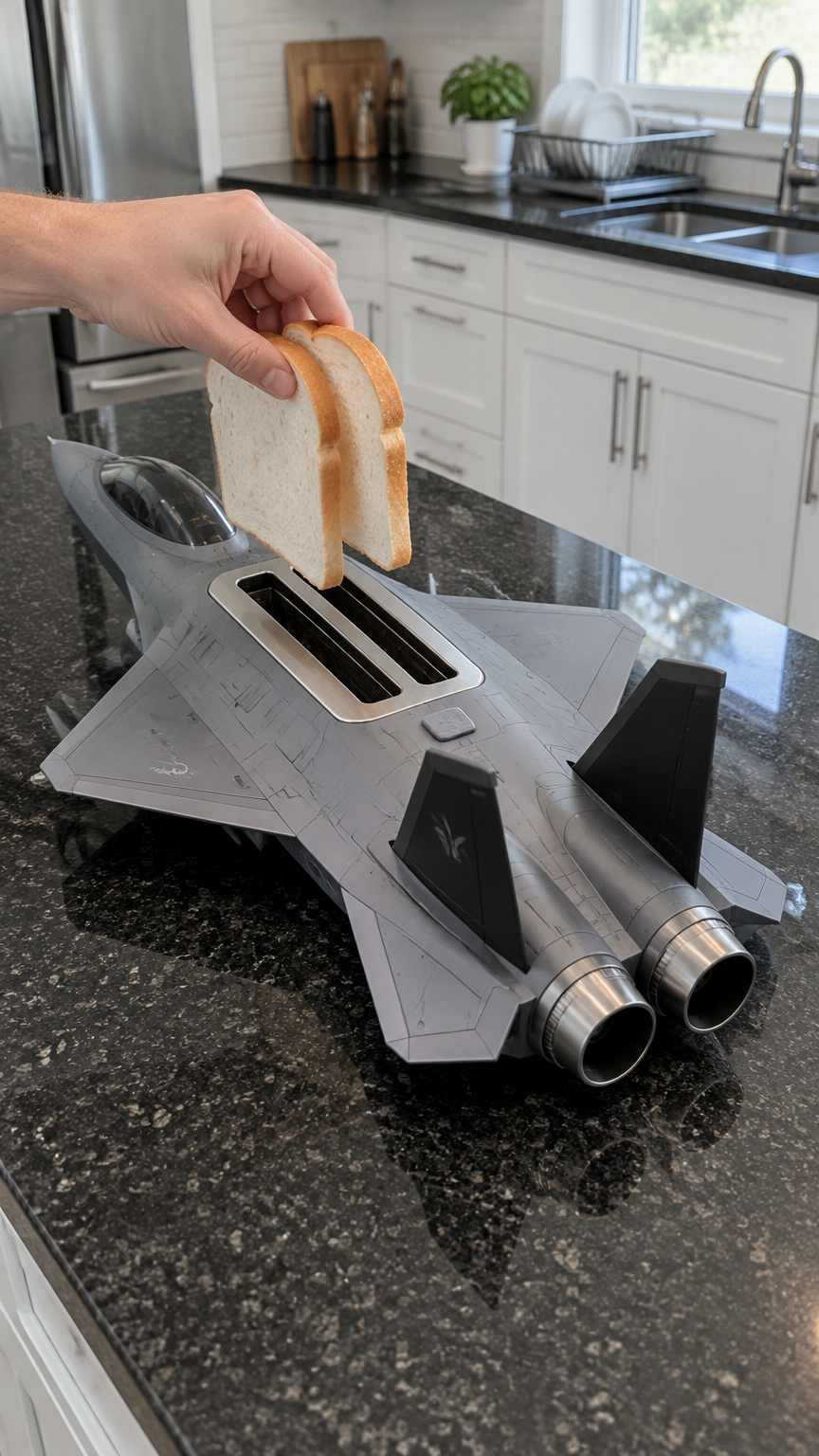
Create one 9:16 vertical image in a realistic smartphone-photo style as the opening frame of a playful short video. Show only one complete kitchen scene.

A detailed aircraft-inspired toaster sits on a dark polished granite kitchen island with fine light speckles. It is a creative countertop kitchen appliance whose shape resembles a sleek twin-tail jet aircraft, but it is clearly a household toaster.

The appliance is about 55 cm long, with a matte gray metallic body, subtle panel lines, and realistic mechanical detailing. It has a long narrow nose, a dark transparent canopy section at the front, wide swept wings, two black vertical tail fins, and two round metal nozzles at the rear. The overall silhouette is low, wide, and streamlined, like a carefully made physical appliance.

Most important structure:
Directly behind the transparent front canopy section, centered between the wings, there is a low-profile brushed stainless-steel rectangular toaster panel built into the top of the body. Inside this panel are exactly two parallel narrow bread slots. The slots run from front to back and sit side by side, each sized for one normal slice of bread. The panel should feel naturally integrated into the appliance body.
Both slots are currently empty and dark inside.

Near the front canopy area, there is a small pressable start button. The button is currently off and not glowing.

Camera and composition:
The camera is positioned beside the kitchen island in a slightly elevated three-quarter rear view. The nose points toward the upper left of the frame, and the two rear nozzles point toward the lower right.
Clearly show the front canopy area, the two bread slots, the wings, the two tail fins, and the two rear nozzles in the same frame.
The appliance is fully visible and not cropped.

An adult right hand enters from the left side of the frame, holding two ordinary slices of white sandwich bread. The slices are pale and untoasted, with light golden crusts and slightly rounded tops.
The two slices are held upright and parallel, each aligned above one of the two bread slots, hovering just above the openings, about to be inserted together.
Show only this one hand and a small part of the forearm, with no visible face or body.

The background is a clean, real modern kitchen with white cabinet doors, slim silver handles, a dark countertop, and a dish rack and sink in the distance. Natural daylight. The background can be slightly soft, while the appliance, hand, and bread remain sharp.

This is the moment before activation. The appliance is off. The front indicator area is unlit, the bread slots are not glowing, and the rear nozzles are dark.

No subtitles, no watermark, no player interface, no collage, and no poster layout.

StartseiteVerlaufToolsFavoriten