
1クレジットあたり最大40%お得対象アカウント:サインアップクレジット30
  • ホーム
  • 画像
  • 動画
  • エージェント
  • プロンプト
  • アセット
  • プラグイン
FilmLune

実際の作例から、AI画像・動画の制作へ。

モデル

画像モデル

  • GPT Image
  • Seedream
  • Nano Banana
  • Midjourney
もっと見る表示を減らす
  • Grok Imagine Image
  • FLUX Image
  • Qwen Image
  • Recraft

動画モデル

  • Gemini Omni Flash
  • Kling
  • MiniMax
  • Wan
もっと見る表示を減らす
  • Seedance
  • FLUX Video
  • HappyHorse
  • Grok Video
  • Veo

作成

  • Studioを開く

ツールとスキル

  • 機能
  • MCPサーバー

リソース

  • すべてのリソース
  • 更新履歴

プロンプト

  • プロンプトを探す
  • 画像プロンプト
  • 動画プロンプト

FilmLune

  • お問い合わせ
  • 料金

コミュニティ

  • XでFilmLuneをフォロー ↗
  • Discordに参加 ↗

法務とプライバシー

  • 利用規約
  • 返金ポリシー
  • プライバシーポリシー
  • GDPR
  • CCPA
  • Cookieの選択
  • 共有ルール

© FilmLune創作と信頼できる情報を、いつも手元に。

ホーム
← ギャラリーに戻る / 画像のプロンプトとサンプル / 敦煌の飛天を描いたMacデスクトップ壁紙

敦煌の飛天を描いたMacデスクトップ壁紙 — AI画像プロンプト

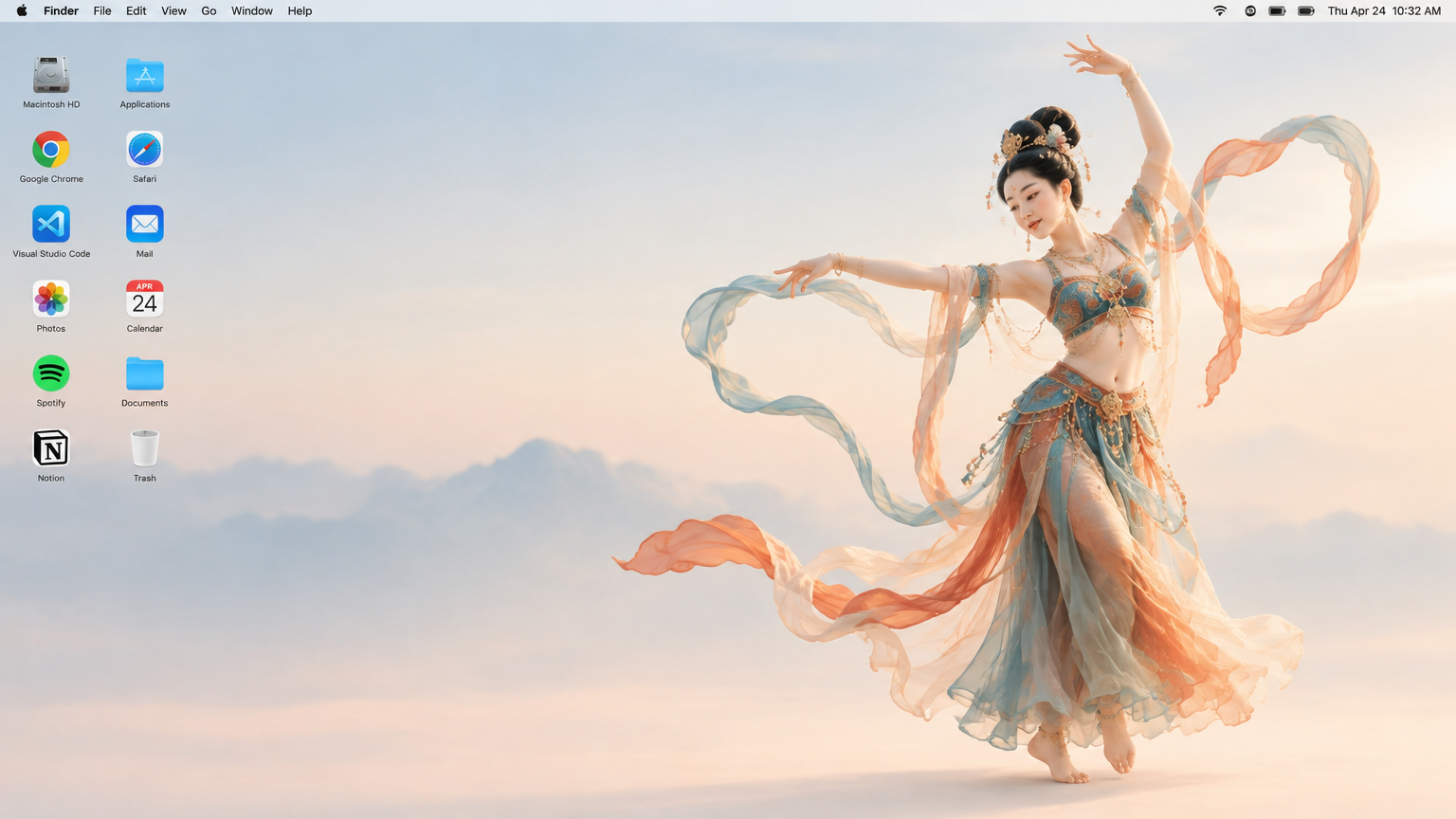
敦煌の飛天を描いたMacデスクトップ壁紙
SpringWangのアバターSpringWangGPT Image 2.5

PROMPT
Generate a 16:9 Apple Mac desktop image.

It should look like a real Mac desktop screen, clean and simple, with a classic macOS-style soft gradient background. Keep the overall feeling minimal, bright, and elegant. Include the normal top menu bar and the small status icons in the top-right corner, so it feels like a proper Mac desktop.

On the left side, place two neat vertical columns of common app icons, like normal desktop icons, not too large. Keep them aligned and natural, with realistic spacing.

On the right side, show a full-body Dunhuang flying apsara dancer. She is elegant and beautiful, wearing flowing traditional Dunhuang-style costume with long ribbons and light silk scarves. She is in a dancing pose, graceful and lively. Her clothes and ribbons are floating slightly in the air.

The dancer should stand clearly on the right side, and the two columns of icons should remain on the left side. The whole image should feel like a genuine Mac desktop, not a poster, not a collage, and not an illustration board.

敦煌の飛天を描いたMacデスクトップ壁紙

左に二列のアプリアイコン、右に全身の敦煌の飛天を置いた、Macデスクトップ風の16:9静止画。

画像のプロンプトとサンプル

活用する場面

このガイドの目的は、次の作品を作ることです。左に二列のアプリアイコン、右に全身の敦煌の飛天を置いた、Macデスクトップ風の16:9静止画。

再現する方法

GPT Image 2.5で明るいグラデーション、メニューバー、控えめなアイコン、舞う帯のある敦煌衣装を描く。

調整のヒント

  • 結果を元のプロンプトと照らし合わせ、ずれた細部だけを調整してください。
  • 次の工程へ進む前に構図と縦横比を確認してください。
  • このケース固有の指示と画面要素を維持してください。

制限と注意点

装飾用の静止画であり、アイコンは実在アプリに対応するとは限らない。