

 SpringWangGPT Image 2.5
PROMPT
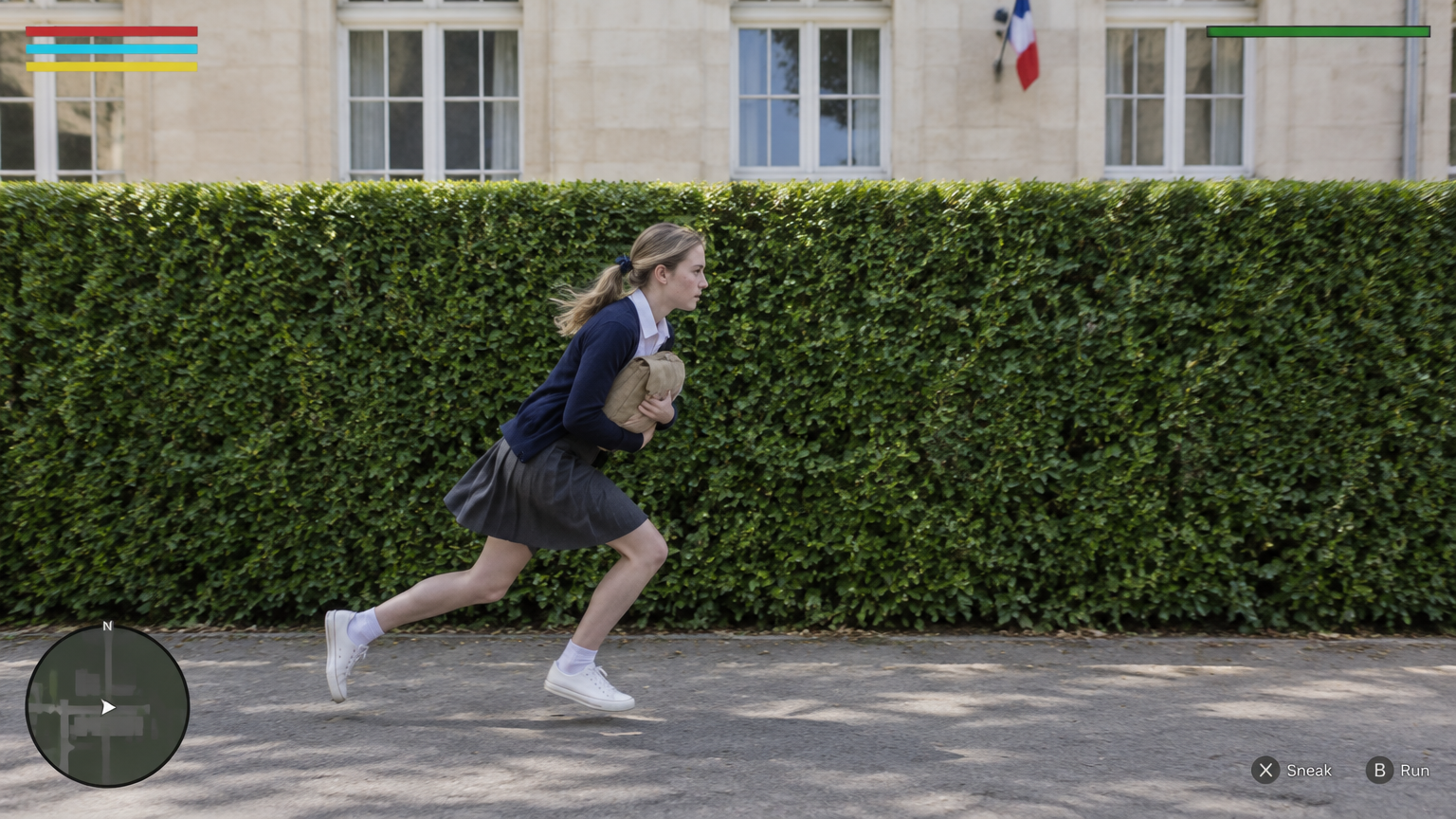
@Create image Create ONE final 16:9 landscape image as the exact opening frame of a photorealistic third-person stealth-game comedy set at a fictional bilingual lycée in France.

The image looks like real live-action footage with a restrained video-game HUD composited over it. Real people, real fabric, real plants and real architecture. Not an illustration, not anime, not a plastic-looking game render.

MOST IMPORTANT — CAMERA AND HEDGE GEOMETRY

The camera looks straight at the LONG FLAT SIDE of a tall, neatly trimmed rectangular hedge.

The camera’s image plane is approximately PARALLEL to the hedge’s long face. The hedge extends horizontally from the left edge to the right edge of the image. Its top edge and lower boundary are almost horizontal.

This is a broadside view across the path, NOT an oblique view looking along the hedge toward a doorway.

The paved path also runs horizontally from screen-left to screen-right, between the camera and the hedge. The school façade behind the hedge is approximately parallel to the hedge and the image plane.

Do not create a diagonal hedge receding into the distance. Do not create a strong vanishing point leading toward an entrance.

OPENING-FRAME OCCLUSION

The hedge’s right-hand END, the school corridor entrance and the principal standing at that entrance are all just BEYOND THE RIGHT EDGE of this first frame.

None of them is visible yet.

The first image must not reveal the doorway, the corridor interior, the principal or a clear gap through the hedge.

Their reveal happens later when the video camera tracks right with the student.

COMPOSITION

The hedge forms a broad, continuous green backdrop across almost the entire frame. Its top sits approximately one-third of the way down the image.

Above it, show a narrow band of pale limestone school façade and white-framed windows. A small French tricolour flag may appear high on the façade, but do not change the camera angle to showcase French architecture.

A narrow strip of paved ground occupies the bottom of the frame.

Place CHLOE in the lower centre-left, running toward screen-right. Keep her complete figure, including both sneakers, inside the image. Her lowered running figure occupies approximately half the image height.

This is a medium-wide gameplay frame, not a fashion portrait or close-up.

MAIN CHARACTER

CHLOE is an 18-year-old adult French female student with fair skin, faint freckles and dark-blonde hair tied into a low ponytail with a small navy ribbon.

She wears an ivory collared blouse, an open navy cardigan, a charcoal-grey knee-length pleated skirt, white ankle socks and white low-top sneakers.

She holds a small tan canvas school satchel tightly against her chest with both arms.

POSE — LOW RUNNING STRIDE

Capture her already moving quickly from left to right.

Her torso leans forward, her hips stay low, both knees are bent, one leg pushes off behind her and the other reaches forward. Her head stays clearly below the hedge’s top edge.

Her face is seen in a natural right-facing profile. She looks ahead along her route, not at the camera and not back over her shoulder.

Her ponytail and skirt trail slightly with the movement. The pose feels furtive, urgent and purposeful, not like upright jogging or a posed sprint.

LIGHT AND REALISM

Bright, natural morning daylight. Rich green foliage, luminous pale stone, believable skin tones and softly filled shadows.

Keep her profile, clothing and hands readable. Natural fabric folds, real leaf texture, grounded foot shadows and only subtle movement in the hair and skirt.

No dark cinematic grading, heavy motion blur, exaggerated depth of field or overexposed highlights.

GAME HUD

A small, clean, flat interface fixed to the screen:
- Top-left: three slim horizontal bars in red, cyan and yellow.
- Top-right: a thin green alert-state bar.
- Bottom-left: a small circular minimap with a white player arrow.
- Bottom-right: muted controller-button prompts.

Leave room beneath the top-left bars for later mission notifications.

No active alert, floating exclamation marker or yellow detection cone in this first frame.

EXCLUSIONS

No visible doorway or teacher in the first frame.
No diagonal view down the hedge.
No portrait pose or eye contact with the camera.
No additional character.
No video-player controls, progress bar, timestamp, play button, edit button, upload button, watermark or platform branding.

Output one complete image only.