
FilmLune · criação e galeria com IA
Prompts selecionados | Crie imagens e vídeos com IA de forma simples
Conheça o FilmLune
O FilmLune reúne um gerador de imagens com IA e uma galeria de exemplos de imagens e vídeos. Cada página mostra o resultado, o prompt disponível, o modelo informado e um método que você pode adaptar.
Explorar todos os promptsUm método claro
Dois pontos de partida
Comece com um exemplo de imagem para trabalhar uma composição estática ou com um exemplo de vídeo para estudar movimento, entradas e duração. As duas bibliotecas levam às mesmas páginas canônicas dos exemplos.
Informações úteis
Os modelos e as configurações descrevem a revisão visível: o FilmLune não troca o modelo silenciosamente durante a transferência. Uma obra externa mantém a atribuição e o link da fonte na página do exemplo.
Apenas quando os direitos daquela revisão permitirem. Nesse caso, a página preserva o prompt e sua origem; uma ação indisponível não é substituída por conteúdo inventado.
Não. A versão do modelo, as entradas e as configurações podem mudar o resultado. Use o método como ponto de partida e confira os parâmetros antes de gerar.
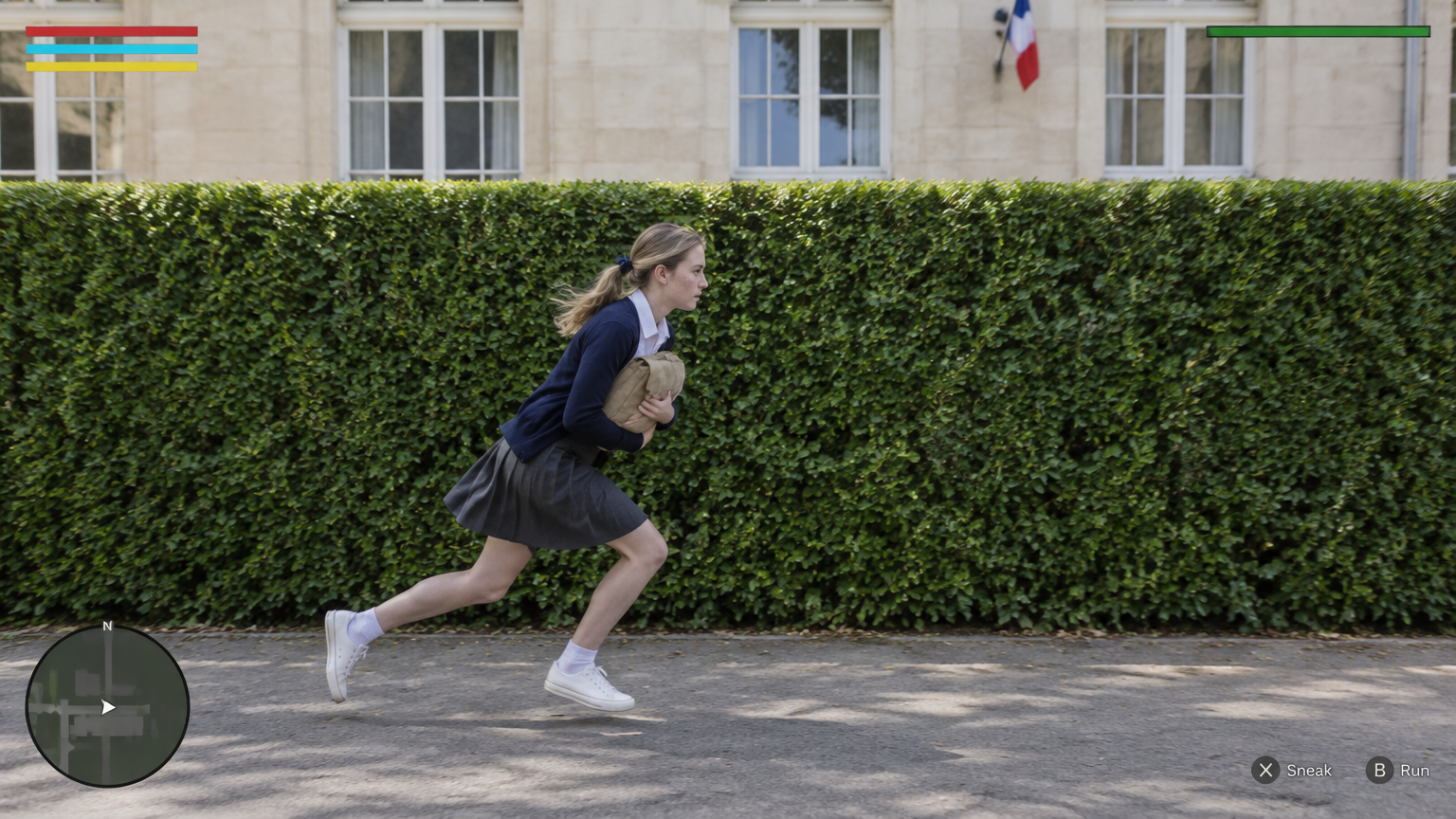
 SpringWangGPT Image 2.5
@Create image Create ONE final 16:9 landscape image as the exact opening frame of a photorealistic third-person stealth-game comedy set at a fictional bilingual lycée in France.
The image looks like real live-action footage with a restrained video-game HUD composited over it. Real people, real fabric, real plants and real architecture. Not an illustration, not anime, not a plastic-looking game render.
MOST IMPORTANT — CAMERA AND HEDGE GEOMETRY
The camera looks straight at the LONG FLAT SIDE of a tall, neatly trimmed rectangular hedge.
The camera’s image plane is approximately PARALLEL to the hedge’s long face. The hedge extends horizontally from the left edge to the right edge of the image. Its top edge and lower boundary are almost horizontal.
This is a broadside view across the path, NOT an oblique view looking along the hedge toward a doorway.
The paved path also runs horizontally from screen-left to screen-right, between the camera and the hedge. The school façade behind the hedge is approximately parallel to the hedge and the image plane.
Do not create a diagonal hedge receding into the distance. Do not create a strong vanishing point leading toward an entrance.
OPENING-FRAME OCCLUSION
The hedge’s right-hand END, the school corridor entrance and the principal standing at that entrance are all just BEYOND THE RIGHT EDGE of this first frame.
None of them is visible yet.
The first image must not reveal the doorway, the corridor interior, the principal or a clear gap through the hedge.
Their reveal happens later when the video camera tracks right with the student.
COMPOSITION
The hedge forms a broad, continuous green backdrop across almost the entire frame. Its top sits approximately one-third of the way down the image.
Above it, show a narrow band of pale limestone school façade and white-framed windows. A small French tricolour flag may appear high on the façade, but do not change the camera angle to showcase French architecture.
A narrow strip of paved ground occupies the bottom of the frame.
Place CHLOE in the lower centre-left, running toward screen-right. Keep her complete figure, including both sneakers, inside the image. Her lowered running figure occupies approximately half the image height.
This is a medium-wide gameplay frame, not a fashion portrait or close-up.
MAIN CHARACTER
CHLOE is an 18-year-old adult French female student with fair skin, faint freckles and dark-blonde hair tied into a low ponytail with a small navy ribbon.
She wears an ivory collared blouse, an open navy cardigan, a charcoal-grey knee-length pleated skirt, white ankle socks and white low-top sneakers.
She holds a small tan canvas school satchel tightly against her chest with both arms.
POSE — LOW RUNNING STRIDE
Capture her already moving quickly from left to right.
Her torso leans forward, her hips stay low, both knees are bent, one leg pushes off behind her and the other reaches forward. Her head stays clearly below the hedge’s top edge.
Her face is seen in a natural right-facing profile. She looks ahead along her route, not at the camera and not back over her shoulder.
Her ponytail and skirt trail slightly with the movement. The pose feels furtive, urgent and purposeful, not like upright jogging or a posed sprint.
LIGHT AND REALISM
Bright, natural morning daylight. Rich green foliage, luminous pale stone, believable skin tones and softly filled shadows.
Keep her profile, clothing and hands readable. Natural fabric folds, real leaf texture, grounded foot shadows and only subtle movement in the hair and skirt.
No dark cinematic grading, heavy motion blur, exaggerated depth of field or overexposed highlights.
GAME HUD
A small, clean, flat interface fixed to the screen:
- Top-left: three slim horizontal bars in red, cyan and yellow.
- Top-right: a thin green alert-state bar.
- Bottom-left: a small circular minimap with a white player arrow.
- Bottom-right: muted controller-button prompts.
Leave room beneath the top-left bars for later mission notifications.
No active alert, floating exclamation marker or yellow detection cone in this first frame.
EXCLUSIONS
No visible doorway or teacher in the first frame.
No diagonal view down the hedge.
No portrait pose or eye contact with the camera.
No additional character.
No video-player controls, progress bar, timestamp, play button, edit button, upload button, watermark or platform branding.
Output one complete image only.Imagem 16:9 com GPT Image 2.5 para o início de uma comédia fotorrealista de jogo furtivo em terceira pessoa, em uma escola bilíngue fictícia na França. Uma estudante adulta de 18 anos corre para a direita junto a uma cerca viva horizontal, com HUD discreto sobre a cena.
Prompts e exemplos de imagemCrie um primeiro quadro crível de comédia de jogo furtivo com aparência de ação real, não ilustração nem renderização plástica. A ponta direita da cerca viva, a entrada do corredor e o diretor ficam logo fora do quadro para serem revelados depois, ao acompanhar a estudante. A câmera permanece paralela à cerca, sem recuo diagonal nem ponto de fuga para uma porta.
Use GPT Image 2.5 em 16:9. Comece pela geometria: câmera paralela ao lado comprido de uma cerca viva retangular, que atravessa todo o quadro sem mostrar a ponta direita; topo quase horizontal cerca de um terço abaixo da borda superior. Ponha caminho pavimentado entre câmera e cerca e fachada de calcário claro com janelas brancas atrás, também paralela; uma pequena bandeira francesa pode aparecer acima. Descreva Chloé, francesa adulta de 18 anos, pele clara, sardas leves, rabo de cavalo baixo castanho-louro com fita azul-marinho, blusa marfim com gola, cardigã azul-marinho aberto, saia plissada cinza-carvão até o joelho, meias brancas e tênis brancos. Ela abraça uma bolsa pequena de lona bege, corre baixa para a direita, tronco inclinado, joelhos dobrados, uma perna atrás e outra à frente, cabeça abaixo da cerca, perfil olhando adiante, saia e cabelo arrastados levemente. Use luz clara da manhã, folhagem verde, pedra luminosa, pele natural e sombras firmes dos pés, sem gradação pesada, desfoque de movimento ou realces estourados. Adicione HUD plano: três barras finas vermelha, ciano e amarela no alto à esquerda com espaço livre abaixo; barra verde de alerta à direita; minimapa circular com seta branca embaixo à esquerda; indicações discretas de botões embaixo à direita. Sem alerta ativo, cone de detecção, porta, professor, outras pessoas, contato visual, controles do jogador ou marca de plataforma.
É uma imagem estática 16:9 com GPT Image 2.5, sem duração ou movimento; o acompanhamento de câmera à direita pertence a gerações posteriores. O modelo pode adicionar ponto de fuga ou mostrar a ponta da cerca, exigindo novas tentativas. A passada baixa, o perfil estrito e a posição exata do HUD podem variar.
 SpringWang
 汪三春
汪三春 SpringWang
 SpringWang
 SpringWang
 SpringWang
 SpringWang
 SpringWang
 SpringWang
 SpringWang
 SpringWang
 SpringWang
 SpringWang
 SpringWang
 SpringWang
 SpringWang
 SpringWang
 SpringWang
 F Y
F Y SpringWang
 SpringWang
 SpringWang
 SpringWang
 SpringWang
 SpringWang
 汪三春
汪三春 汪三春
汪三春 SpringWang
 SpringWang
 SpringWang
 SpringWang
 SpringWang
 SpringWangSpringWangGPT Image 2.5
@Create image Create ONE final 16:9 landscape image as the exact opening frame of a photorealistic third-person stealth-game comedy set at a fictional bilingual lycée in France.
The image looks like real live-action footage with a restrained video-game HUD composited over it. Real people, real fabric, real plants and real architecture. Not an illustration, not anime, not a plastic-looking game render.
MOST IMPORTANT — CAMERA AND HEDGE GEOMETRY
The camera looks straight at the LONG FLAT SIDE of a tall, neatly trimmed rectangular hedge.
The camera’s image plane is approximately PARALLEL to the hedge’s long face. The hedge extends horizontally from the left edge to the right edge of the image. Its top edge and lower boundary are almost horizontal.
This is a broadside view across the path, NOT an oblique view looking along the hedge toward a doorway.
The paved path also runs horizontally from screen-left to screen-right, between the camera and the hedge. The school façade behind the hedge is approximately parallel to the hedge and the image plane.
Do not create a diagonal hedge receding into the distance. Do not create a strong vanishing point leading toward an entrance.
OPENING-FRAME OCCLUSION
The hedge’s right-hand END, the school corridor entrance and the principal standing at that entrance are all just BEYOND THE RIGHT EDGE of this first frame.
None of them is visible yet.
The first image must not reveal the doorway, the corridor interior, the principal or a clear gap through the hedge.
Their reveal happens later when the video camera tracks right with the student.
COMPOSITION
The hedge forms a broad, continuous green backdrop across almost the entire frame. Its top sits approximately one-third of the way down the image.
Above it, show a narrow band of pale limestone school façade and white-framed windows. A small French tricolour flag may appear high on the façade, but do not change the camera angle to showcase French architecture.
A narrow strip of paved ground occupies the bottom of the frame.
Place CHLOE in the lower centre-left, running toward screen-right. Keep her complete figure, including both sneakers, inside the image. Her lowered running figure occupies approximately half the image height.
This is a medium-wide gameplay frame, not a fashion portrait or close-up.
MAIN CHARACTER
CHLOE is an 18-year-old adult French female student with fair skin, faint freckles and dark-blonde hair tied into a low ponytail with a small navy ribbon.
She wears an ivory collared blouse, an open navy cardigan, a charcoal-grey knee-length pleated skirt, white ankle socks and white low-top sneakers.
She holds a small tan canvas school satchel tightly against her chest with both arms.
POSE — LOW RUNNING STRIDE
Capture her already moving quickly from left to right.
Her torso leans forward, her hips stay low, both knees are bent, one leg pushes off behind her and the other reaches forward. Her head stays clearly below the hedge’s top edge.
Her face is seen in a natural right-facing profile. She looks ahead along her route, not at the camera and not back over her shoulder.
Her ponytail and skirt trail slightly with the movement. The pose feels furtive, urgent and purposeful, not like upright jogging or a posed sprint.
LIGHT AND REALISM
Bright, natural morning daylight. Rich green foliage, luminous pale stone, believable skin tones and softly filled shadows.
Keep her profile, clothing and hands readable. Natural fabric folds, real leaf texture, grounded foot shadows and only subtle movement in the hair and skirt.
No dark cinematic grading, heavy motion blur, exaggerated depth of field or overexposed highlights.
GAME HUD
A small, clean, flat interface fixed to the screen:
- Top-left: three slim horizontal bars in red, cyan and yellow.
- Top-right: a thin green alert-state bar.
- Bottom-left: a small circular minimap with a white player arrow.
- Bottom-right: muted controller-button prompts.
Leave room beneath the top-left bars for later mission notifications.
No active alert, floating exclamation marker or yellow detection cone in this first frame.
EXCLUSIONS
No visible doorway or teacher in the first frame.
No diagonal view down the hedge.
No portrait pose or eye contact with the camera.
No additional character.
No video-player controls, progress bar, timestamp, play button, edit button, upload button, watermark or platform branding.
Output one complete image only.Imagem 16:9 com GPT Image 2.5 para o início de uma comédia fotorrealista de jogo furtivo em terceira pessoa, em uma escola bilíngue fictícia na França. Uma estudante adulta de 18 anos corre para a direita junto a uma cerca viva horizontal, com HUD discreto sobre a cena.
Prompts e exemplos de imagemCrie um primeiro quadro crível de comédia de jogo furtivo com aparência de ação real, não ilustração nem renderização plástica. A ponta direita da cerca viva, a entrada do corredor e o diretor ficam logo fora do quadro para serem revelados depois, ao acompanhar a estudante. A câmera permanece paralela à cerca, sem recuo diagonal nem ponto de fuga para uma porta.
Use GPT Image 2.5 em 16:9. Comece pela geometria: câmera paralela ao lado comprido de uma cerca viva retangular, que atravessa todo o quadro sem mostrar a ponta direita; topo quase horizontal cerca de um terço abaixo da borda superior. Ponha caminho pavimentado entre câmera e cerca e fachada de calcário claro com janelas brancas atrás, também paralela; uma pequena bandeira francesa pode aparecer acima. Descreva Chloé, francesa adulta de 18 anos, pele clara, sardas leves, rabo de cavalo baixo castanho-louro com fita azul-marinho, blusa marfim com gola, cardigã azul-marinho aberto, saia plissada cinza-carvão até o joelho, meias brancas e tênis brancos. Ela abraça uma bolsa pequena de lona bege, corre baixa para a direita, tronco inclinado, joelhos dobrados, uma perna atrás e outra à frente, cabeça abaixo da cerca, perfil olhando adiante, saia e cabelo arrastados levemente. Use luz clara da manhã, folhagem verde, pedra luminosa, pele natural e sombras firmes dos pés, sem gradação pesada, desfoque de movimento ou realces estourados. Adicione HUD plano: três barras finas vermelha, ciano e amarela no alto à esquerda com espaço livre abaixo; barra verde de alerta à direita; minimapa circular com seta branca embaixo à esquerda; indicações discretas de botões embaixo à direita. Sem alerta ativo, cone de detecção, porta, professor, outras pessoas, contato visual, controles do jogador ou marca de plataforma.
É uma imagem estática 16:9 com GPT Image 2.5, sem duração ou movimento; o acompanhamento de câmera à direita pertence a gerações posteriores. O modelo pode adicionar ponto de fuga ou mostrar a ponta da cerca, exigindo novas tentativas. A passada baixa, o perfil estrito e a posição exata do HUD podem variar.