
FilmLune · AI 生成与案例库
精选提示词 | 轻松创作 AI 图片与视频
了解 FilmLune
FilmLune 将 AI 图片生成器与丰富的图片和视频案例库结合起来。每个案例都会展示生成结果、可用提示词、所用模型,以及可供您调整的生成方法。
探索所有提示词清晰可读的生成方法
两种输入方式
可以从静态构图的图片案例入手,也可以通过视频案例研究运动、输入和时长;两类入口都会进入同一份规范案例详情。
实用边界
模型与设置对应当前可见版本:FilmLune 在带入 Studio 时不会静默替换模型;外部作品会在详情页保留署名与来源链接。
仅在该修订版本的授权允许的情况下方可执行。此操作会保留原始提示及其来源信息;不可用的操作绝不会被替换为虚构内容。
不会。不同模型版本、输入和设置都可能改变结果。请把案例方法作为起点,并在生成前核对参数。
 SpringWangGPT Image 2.5
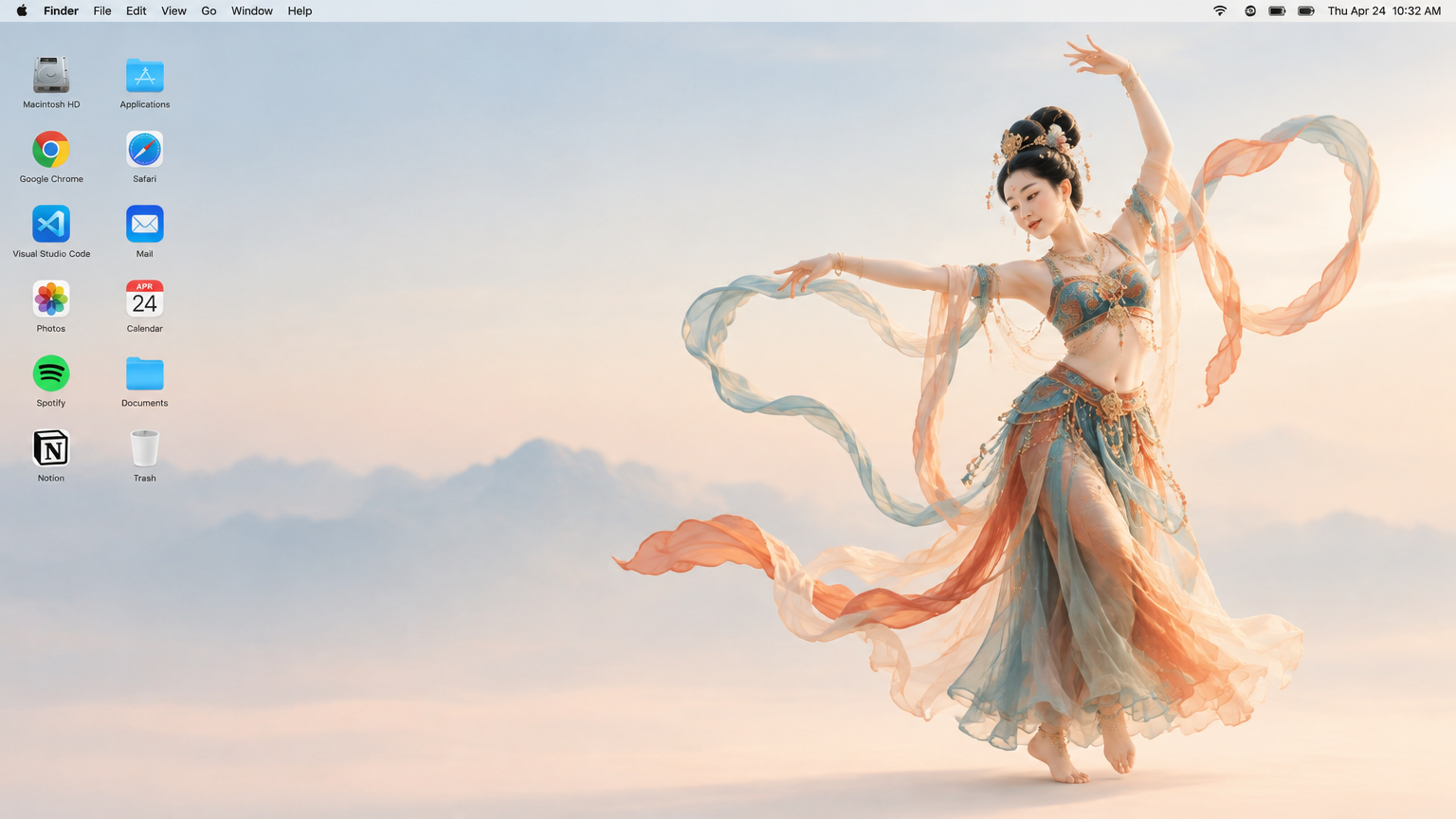
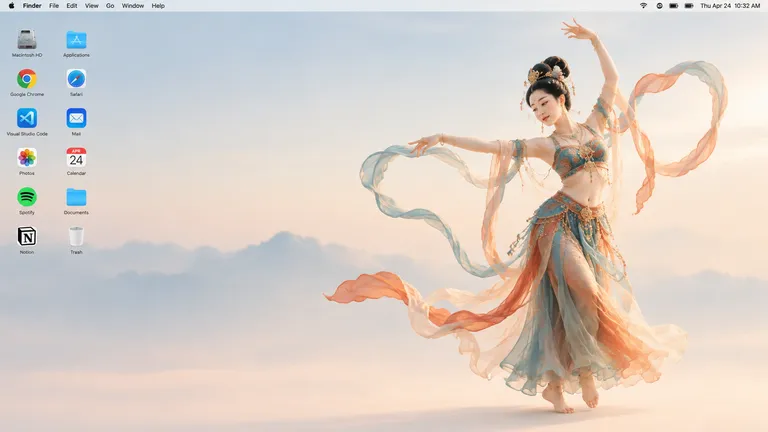
Generate a 16:9 Apple Mac desktop image.
It should look like a real Mac desktop screen, clean and simple, with a classic macOS-style soft gradient background. Keep the overall feeling minimal, bright, and elegant. Include the normal top menu bar and the small status icons in the top-right corner, so it feels like a proper Mac desktop.
On the left side, place two neat vertical columns of common app icons, like normal desktop icons, not too large. Keep them aligned and natural, with realistic spacing.
On the right side, show a full-body Dunhuang flying apsara dancer. She is elegant and beautiful, wearing flowing traditional Dunhuang-style costume with long ribbons and light silk scarves. She is in a dancing pose, graceful and lively. Her clothes and ribbons are floating slightly in the air.
The dancer should stand clearly on the right side, and the two columns of icons should remain on the left side. The whole image should feel like a genuine Mac desktop, not a poster, not a collage, and not an illustration board.一幅 16:9 比例的图像,模拟完整的 Mac 桌面屏幕:右侧是全身敦煌飞天舞者,左侧是两列整齐排列的应用图标。
图片提示词与案例生成一张看起来像真实 macOS 桌面的电脑壁纸:一侧是干净可信的系统界面,另一侧是飘逸灵动的舞者形象。目标是在软件真实感与艺术美感之间取得平衡,仿佛飞天就站在桌面上。
使用 GPT Image 2.5 以 16:9 比例生成图像。先描述框架:干净的 Mac 桌面屏幕,经典的 macOS 风格柔和渐变背景,顶部有正常的菜单栏,右上角带有小型状态图标。然后说明构图:左侧两列垂直排列的常见应用图标,间距均匀、尺寸适中;右侧是一位全身敦煌飞天舞者,舞姿优雅灵动,身穿飘逸的传统敦煌服饰,长长的飘带和轻盈的丝绸披帛在空中微微浮动。最后强调结果应像真实的电脑桌面,而不是海报、拼贴或插画板。
输出为 GPT Image 2.5 生成的单张静态 16:9 图像,飘带没有动态效果。图中图标均为虚构,不对应任何真实应用,菜单栏仅起装饰作用。舞者手部或头饰等细节在不同生成之间可能有差异。该图像不应被当作真实操作系统的截图来展示。
 SpringWang
 SpringWang
 SpringWang
 SpringWang
 汪三春
汪三春 汪三春
汪三春 SpringWang
 SpringWang
 SpringWang
 SpringWang
 SpringWang
 SpringWangSpringWangGPT Image 2.5
Generate a 16:9 Apple Mac desktop image.
It should look like a real Mac desktop screen, clean and simple, with a classic macOS-style soft gradient background. Keep the overall feeling minimal, bright, and elegant. Include the normal top menu bar and the small status icons in the top-right corner, so it feels like a proper Mac desktop.
On the left side, place two neat vertical columns of common app icons, like normal desktop icons, not too large. Keep them aligned and natural, with realistic spacing.
On the right side, show a full-body Dunhuang flying apsara dancer. She is elegant and beautiful, wearing flowing traditional Dunhuang-style costume with long ribbons and light silk scarves. She is in a dancing pose, graceful and lively. Her clothes and ribbons are floating slightly in the air.
The dancer should stand clearly on the right side, and the two columns of icons should remain on the left side. The whole image should feel like a genuine Mac desktop, not a poster, not a collage, and not an illustration board.一幅 16:9 比例的图像,模拟完整的 Mac 桌面屏幕:右侧是全身敦煌飞天舞者,左侧是两列整齐排列的应用图标。
图片提示词与案例生成一张看起来像真实 macOS 桌面的电脑壁纸:一侧是干净可信的系统界面,另一侧是飘逸灵动的舞者形象。目标是在软件真实感与艺术美感之间取得平衡,仿佛飞天就站在桌面上。
使用 GPT Image 2.5 以 16:9 比例生成图像。先描述框架:干净的 Mac 桌面屏幕,经典的 macOS 风格柔和渐变背景,顶部有正常的菜单栏,右上角带有小型状态图标。然后说明构图:左侧两列垂直排列的常见应用图标,间距均匀、尺寸适中;右侧是一位全身敦煌飞天舞者,舞姿优雅灵动,身穿飘逸的传统敦煌服饰,长长的飘带和轻盈的丝绸披帛在空中微微浮动。最后强调结果应像真实的电脑桌面,而不是海报、拼贴或插画板。
输出为 GPT Image 2.5 生成的单张静态 16:9 图像,飘带没有动态效果。图中图标均为虚构,不对应任何真实应用,菜单栏仅起装饰作用。舞者手部或头饰等细节在不同生成之间可能有差异。该图像不应被当作真实操作系统的截图来展示。