
FilmLune · AI 生成与案例库
精选提示词 | 轻松创作 AI 图片与视频
了解 FilmLune
FilmLune 将 AI 图片生成器与丰富的图片和视频案例库结合起来。每个案例都会展示生成结果、可用提示词、所用模型,以及可供您调整的生成方法。
探索所有提示词清晰可读的生成方法
两种输入方式
可以从静态构图的图片案例入手,也可以通过视频案例研究运动、输入和时长;两类入口都会进入同一份规范案例详情。
实用边界
模型与设置对应当前可见版本:FilmLune 在带入 Studio 时不会静默替换模型;外部作品会在详情页保留署名与来源链接。
仅在该修订版本的授权允许的情况下方可执行。此操作会保留原始提示及其来源信息;不可用的操作绝不会被替换为虚构内容。
不会。不同模型版本、输入和设置都可能改变结果。请把案例方法作为起点,并在生成前核对参数。
 SpringWangMiniMax H3 · estimation
提示词
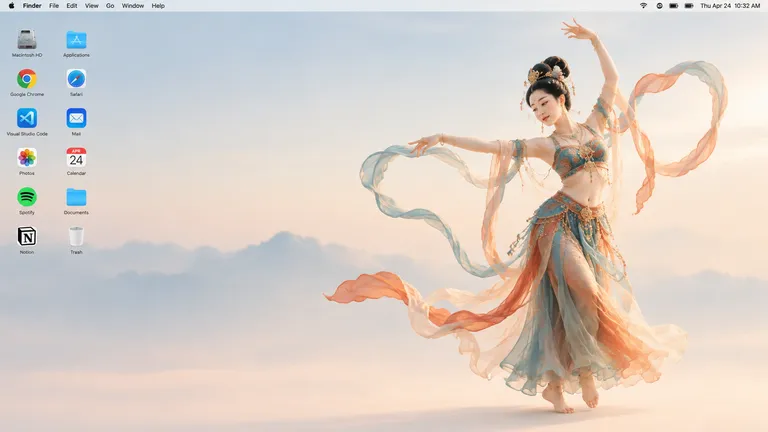
Generate a 16:9 Apple Mac desktop image.

It should look like a real Mac desktop screen, clean and simple, with a classic macOS-style soft gradient background. Keep the overall feeling minimal, bright, and elegant. Include the normal top menu bar and the small status icons in the top-right corner, so it feels like a proper Mac desktop.

On the left side, place two neat vertical columns of common app icons, like normal desktop icons, not too large. Keep them aligned and natural, with realistic spacing.

On the right side, show a full-body Dunhuang flying apsara dancer. She is elegant and beautiful, wearing flowing traditional Dunhuang-style costume with long ribbons and light silk scarves. She is in a dancing pose, graceful and lively. Her clothes and ribbons are floating slightly in the air.

The dancer should stand clearly on the right side, and the two columns of icons should remain on the left side. The whole image should feel like a genuine Mac desktop, not a poster, not a collage, and not an illustration board.Use the reference image as the starting frame.
Create a 16:9 video with a fixed camera. The whole scene is presented like a real Mac desktop.
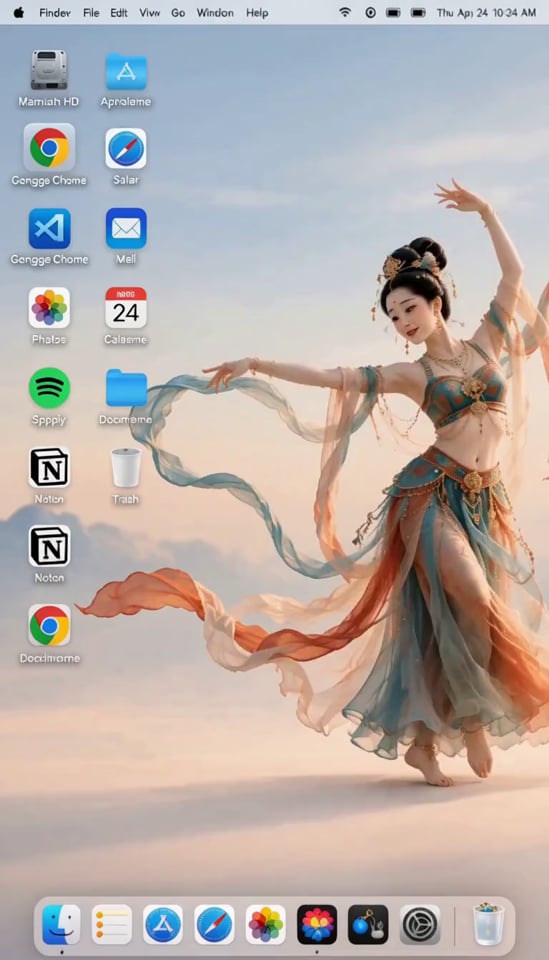
At the beginning, the Dunhuang flying apsara on the right is dancing gracefully. Her movements are elegant and light. As her foot steps down, she accidentally tugs the desktop background like pulling a curtain. The background shakes with a visible ripple.
Because of the shake, all the app icons on the left are jolted loose and fall down onto the bottom of the screen.
The apsara is startled. She immediately stops dancing, covers her mouth with both hands in surprise, looking embarrassed and panicked for a moment.
Then she quickly runs to the left side and hurriedly puts the fallen icons back one by one into their original positions. She is clearly in a rush. Because she is flustered, two of the icons are placed slightly crooked.
After that, she quickly returns to her original position on the right side, recreates her starting dance pose, and forces a slightly awkward smile, pretending everything is fine. A gentle breeze blows, and her clothes and ribbons move softly.
Keep the tone playful and humorous.
Background music: it starts with traditional Dunhuang-style music, then after the accident it changes into a light, funny, playful style.先用 16:9 图像生成一个逼真的 macOS 桌面画面,右侧立着一位敦煌飞天舞者;随后生成一段约 10 秒的视频:她跳舞时不小心扯动桌面壁纸,图标掉落,她慌忙收拾后若无其事地恢复原状。
视频提示词与案例制作一段短小的喜剧内容,把 Mac 桌面简洁干净的观感与敦煌飞天的飘逸舞姿结合在一起。提示词的意图在于反差幽默:一位优雅的传统形象笨拙地与界面元素互动,最终形成一段轻松诙谐的视频,适合社交平台传播或作为趣味动态壁纸创意。
第一步——参考图:使用 GPT Image 2.5 生成一张 16:9 图像,画面要像真实的 Mac 桌面截图。背景是经典的 macOS 风格柔和渐变,明亮、简约、优雅,顶部有正常的菜单栏,右上角带状态小图标。左侧排列两列整齐的常用应用图标,尺寸适中、间距自然。右侧是一位全身敦煌飞天舞者,姿态曼妙灵动,身着飘逸的传统敦煌服饰,长绸带与轻纱在空中微微飘动。整体必须像真实的桌面,而不是海报、拼贴或插画板。第二步——视频:以这张图作为首帧,用 MiniMax H3 生成约 10 秒的视频(输出画幅为 4:7),镜头固定。开头飞天在右侧优雅起舞,动作轻盈;落脚时她不小心像拉窗帘一样扯动了桌面背景,画面出现明显涟漪般的晃动。左侧的应用图标被震松,全部掉落到屏幕底部。飞天吓了一跳,立刻停下,双手捂嘴,显得既尴尬又慌张;随后她急忙跑到左侧,把掉落的图标一个个放回原位,因为手忙脚乱,有两个图标放得略微歪斜。最后她回到右侧原位,重新摆出开场舞姿,勉强挤出有点尴尬的微笑,假装一切正常,微风轻拂,衣带随风飘动。配乐从事敦煌风传统音乐,在事故发生后转为轻快诙谐的风格。
视频时长约 10 秒,节奏非常紧凑:图标掉落、收拾整理、恢复姿态都要塞进这段时间,容易显得仓促。视频模型为估算值,且输出画幅(4:7)与要求的 16:9 不符,可能需要重新裁切。具体应用图标的还原度以及'两个图标略微歪斜'这类精细细节都只能近似实现,取决于图生视频的一致性表现。
 SpringWang
 SpringWang
 SpringWang
 SpringWang
 汪三春
汪三春 汪三春
汪三春 SpringWang
 SpringWang
 SpringWang
 SpringWang
 SpringWang
 SpringWangSpringWangMiniMax H3 · estimation
提示词
Generate a 16:9 Apple Mac desktop image.

It should look like a real Mac desktop screen, clean and simple, with a classic macOS-style soft gradient background. Keep the overall feeling minimal, bright, and elegant. Include the normal top menu bar and the small status icons in the top-right corner, so it feels like a proper Mac desktop.

On the left side, place two neat vertical columns of common app icons, like normal desktop icons, not too large. Keep them aligned and natural, with realistic spacing.

On the right side, show a full-body Dunhuang flying apsara dancer. She is elegant and beautiful, wearing flowing traditional Dunhuang-style costume with long ribbons and light silk scarves. She is in a dancing pose, graceful and lively. Her clothes and ribbons are floating slightly in the air.

The dancer should stand clearly on the right side, and the two columns of icons should remain on the left side. The whole image should feel like a genuine Mac desktop, not a poster, not a collage, and not an illustration board.Use the reference image as the starting frame.
Create a 16:9 video with a fixed camera. The whole scene is presented like a real Mac desktop.
At the beginning, the Dunhuang flying apsara on the right is dancing gracefully. Her movements are elegant and light. As her foot steps down, she accidentally tugs the desktop background like pulling a curtain. The background shakes with a visible ripple.
Because of the shake, all the app icons on the left are jolted loose and fall down onto the bottom of the screen.
The apsara is startled. She immediately stops dancing, covers her mouth with both hands in surprise, looking embarrassed and panicked for a moment.
Then she quickly runs to the left side and hurriedly puts the fallen icons back one by one into their original positions. She is clearly in a rush. Because she is flustered, two of the icons are placed slightly crooked.
After that, she quickly returns to her original position on the right side, recreates her starting dance pose, and forces a slightly awkward smile, pretending everything is fine. A gentle breeze blows, and her clothes and ribbons move softly.
Keep the tone playful and humorous.
Background music: it starts with traditional Dunhuang-style music, then after the accident it changes into a light, funny, playful style.先用 16:9 图像生成一个逼真的 macOS 桌面画面,右侧立着一位敦煌飞天舞者;随后生成一段约 10 秒的视频:她跳舞时不小心扯动桌面壁纸,图标掉落,她慌忙收拾后若无其事地恢复原状。
视频提示词与案例制作一段短小的喜剧内容,把 Mac 桌面简洁干净的观感与敦煌飞天的飘逸舞姿结合在一起。提示词的意图在于反差幽默:一位优雅的传统形象笨拙地与界面元素互动,最终形成一段轻松诙谐的视频,适合社交平台传播或作为趣味动态壁纸创意。
第一步——参考图:使用 GPT Image 2.5 生成一张 16:9 图像,画面要像真实的 Mac 桌面截图。背景是经典的 macOS 风格柔和渐变,明亮、简约、优雅,顶部有正常的菜单栏,右上角带状态小图标。左侧排列两列整齐的常用应用图标,尺寸适中、间距自然。右侧是一位全身敦煌飞天舞者,姿态曼妙灵动,身着飘逸的传统敦煌服饰,长绸带与轻纱在空中微微飘动。整体必须像真实的桌面,而不是海报、拼贴或插画板。第二步——视频:以这张图作为首帧,用 MiniMax H3 生成约 10 秒的视频(输出画幅为 4:7),镜头固定。开头飞天在右侧优雅起舞,动作轻盈;落脚时她不小心像拉窗帘一样扯动了桌面背景,画面出现明显涟漪般的晃动。左侧的应用图标被震松,全部掉落到屏幕底部。飞天吓了一跳,立刻停下,双手捂嘴,显得既尴尬又慌张;随后她急忙跑到左侧,把掉落的图标一个个放回原位,因为手忙脚乱,有两个图标放得略微歪斜。最后她回到右侧原位,重新摆出开场舞姿,勉强挤出有点尴尬的微笑,假装一切正常,微风轻拂,衣带随风飘动。配乐从事敦煌风传统音乐,在事故发生后转为轻快诙谐的风格。
视频时长约 10 秒,节奏非常紧凑:图标掉落、收拾整理、恢复姿态都要塞进这段时间,容易显得仓促。视频模型为估算值,且输出画幅(4:7)与要求的 16:9 不符,可能需要重新裁切。具体应用图标的还原度以及'两个图标略微歪斜'这类精细细节都只能近似实现,取决于图生视频的一致性表现。