
FilmLune · AI generator and gallery
Curated prompts | Create AI images & videos with ease
Understand FilmLune
FilmLune combines an AI image generator with a gallery of image and video examples. Each detail shows the result, available prompt, declared model, and a method you can adapt.
Explore all promptsA readable method
Two ways in
Start with an image example for a still composition, or a video example to study motion, inputs, and duration. Both libraries lead to the same canonical case details.
Useful boundaries
Models and settings describe the visible revision: FilmLune does not silently replace a model during handoff. External work keeps its attribution and source link on the detail page.
Only when that revision’s rights permit it. The detail then preserves the prompt and its provenance; an unavailable action is never replaced with invented content.
No. Model versions, inputs, and settings can change the output. Use the method as a starting point and check the parameters before generating.
 SpringWangGPT Image 2.5
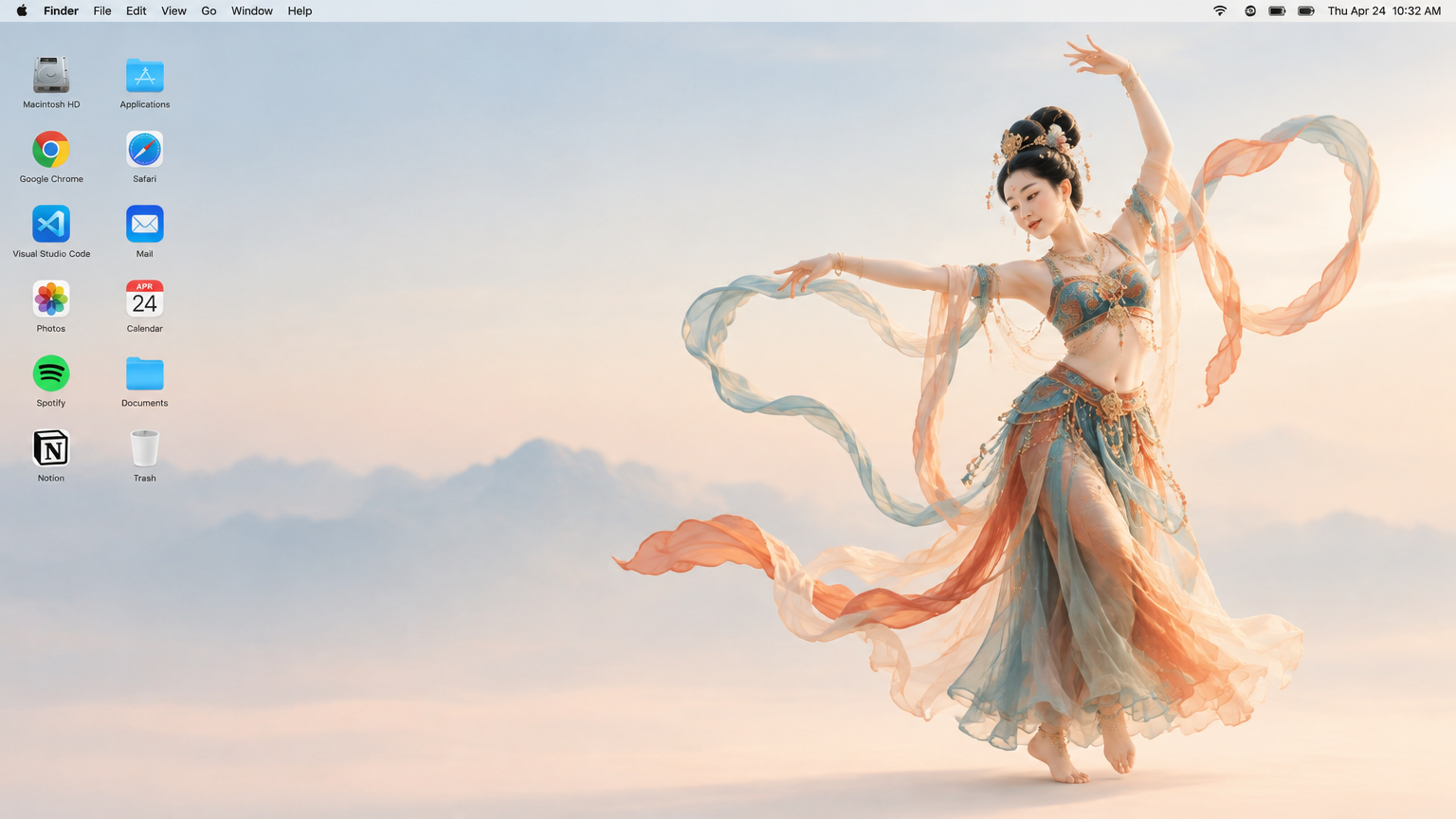
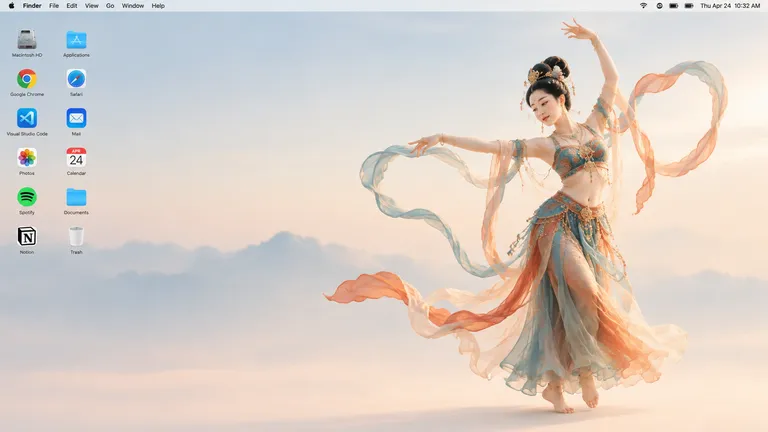
Generate a 16:9 Apple Mac desktop image.
It should look like a real Mac desktop screen, clean and simple, with a classic macOS-style soft gradient background. Keep the overall feeling minimal, bright, and elegant. Include the normal top menu bar and the small status icons in the top-right corner, so it feels like a proper Mac desktop.
On the left side, place two neat vertical columns of common app icons, like normal desktop icons, not too large. Keep them aligned and natural, with realistic spacing.
On the right side, show a full-body Dunhuang flying apsara dancer. She is elegant and beautiful, wearing flowing traditional Dunhuang-style costume with long ribbons and light silk scarves. She is in a dancing pose, graceful and lively. Her clothes and ribbons are floating slightly in the air.
The dancer should stand clearly on the right side, and the two columns of icons should remain on the left side. The whole image should feel like a genuine Mac desktop, not a poster, not a collage, and not an illustration board.A 16:9 image that simulates a complete Mac desktop screen, with a full-body Dunhuang flying apsara dancer on the right and two neat columns of app icons on the left.
Image prompts and examplesProduce a computer wallpaper that reads as a genuine macOS desktop: a clean, believable interface on one side and an expressive, floating dancer on the other. The goal is balance between software realism and graceful movement, as if the apsara were simply standing on the desktop itself.
Generate the image with GPT Image 2.5 at a 16:9 ratio. Describe the frame first: a clean Mac desktop screen with a classic soft macOS-style gradient background, a normal top menu bar and small status icons in the upper-right corner. Then specify the composition: two vertical columns of common app icons on the left, evenly spaced and modest in size. On the right, a full-body Dunhuang flying apsara dancer in a graceful dancing pose, wearing flowing traditional Dunhuang costume with long ribbons and light silk scarves drifting slightly in the air. Close by stating the result should feel like a real desktop, not a poster, collage or illustration board.
The output is a single static image in 16:9 from GPT Image 2.5, with no motion in the ribbons. The icons shown are invented and correspond to no real applications; the menu bar is purely decorative. Fine details of the dancer’s hands or headdress may vary between generations. The result should not be presented as a screenshot of an actual operating system.
 SpringWang
 SpringWang
 SpringWang
 SpringWang
 汪三春
汪三春 汪三春
汪三春 SpringWang
 SpringWang
 SpringWang
 SpringWang
 SpringWang
 SpringWangSpringWangGPT Image 2.5
Generate a 16:9 Apple Mac desktop image.
It should look like a real Mac desktop screen, clean and simple, with a classic macOS-style soft gradient background. Keep the overall feeling minimal, bright, and elegant. Include the normal top menu bar and the small status icons in the top-right corner, so it feels like a proper Mac desktop.
On the left side, place two neat vertical columns of common app icons, like normal desktop icons, not too large. Keep them aligned and natural, with realistic spacing.
On the right side, show a full-body Dunhuang flying apsara dancer. She is elegant and beautiful, wearing flowing traditional Dunhuang-style costume with long ribbons and light silk scarves. She is in a dancing pose, graceful and lively. Her clothes and ribbons are floating slightly in the air.
The dancer should stand clearly on the right side, and the two columns of icons should remain on the left side. The whole image should feel like a genuine Mac desktop, not a poster, not a collage, and not an illustration board.A 16:9 image that simulates a complete Mac desktop screen, with a full-body Dunhuang flying apsara dancer on the right and two neat columns of app icons on the left.
Image prompts and examplesProduce a computer wallpaper that reads as a genuine macOS desktop: a clean, believable interface on one side and an expressive, floating dancer on the other. The goal is balance between software realism and graceful movement, as if the apsara were simply standing on the desktop itself.
Generate the image with GPT Image 2.5 at a 16:9 ratio. Describe the frame first: a clean Mac desktop screen with a classic soft macOS-style gradient background, a normal top menu bar and small status icons in the upper-right corner. Then specify the composition: two vertical columns of common app icons on the left, evenly spaced and modest in size. On the right, a full-body Dunhuang flying apsara dancer in a graceful dancing pose, wearing flowing traditional Dunhuang costume with long ribbons and light silk scarves drifting slightly in the air. Close by stating the result should feel like a real desktop, not a poster, collage or illustration board.
The output is a single static image in 16:9 from GPT Image 2.5, with no motion in the ribbons. The icons shown are invented and correspond to no real applications; the menu bar is purely decorative. Fine details of the dancer’s hands or headdress may vary between generations. The result should not be presented as a screenshot of an actual operating system.