
FilmLune · AI generator and gallery
Curated prompts | Create AI images & videos with ease
Understand FilmLune
FilmLune combines an AI image generator with a gallery of image and video examples. Each detail shows the result, available prompt, declared model, and a method you can adapt.
Explore all promptsA readable method
Two ways in
Start with an image example for a still composition, or a video example to study motion, inputs, and duration. Both libraries lead to the same canonical case details.
Useful boundaries
Models and settings describe the visible revision: FilmLune does not silently replace a model during handoff. External work keeps its attribution and source link on the detail page.
Only when that revision’s rights permit it. The detail then preserves the prompt and its provenance; an unavailable action is never replaced with invented content.
No. Model versions, inputs, and settings can change the output. Use the method as a starting point and check the parameters before generating.
 SpringWangMiniMax H3 · estimation
PROMPT
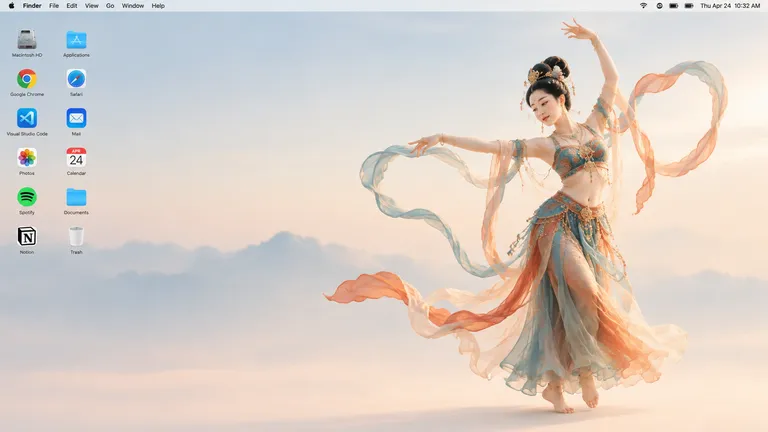
Generate a 16:9 Apple Mac desktop image.

It should look like a real Mac desktop screen, clean and simple, with a classic macOS-style soft gradient background. Keep the overall feeling minimal, bright, and elegant. Include the normal top menu bar and the small status icons in the top-right corner, so it feels like a proper Mac desktop.

On the left side, place two neat vertical columns of common app icons, like normal desktop icons, not too large. Keep them aligned and natural, with realistic spacing.

On the right side, show a full-body Dunhuang flying apsara dancer. She is elegant and beautiful, wearing flowing traditional Dunhuang-style costume with long ribbons and light silk scarves. She is in a dancing pose, graceful and lively. Her clothes and ribbons are floating slightly in the air.

The dancer should stand clearly on the right side, and the two columns of icons should remain on the left side. The whole image should feel like a genuine Mac desktop, not a poster, not a collage, and not an illustration board.Use the reference image as the starting frame.
Create a 16:9 video with a fixed camera. The whole scene is presented like a real Mac desktop.
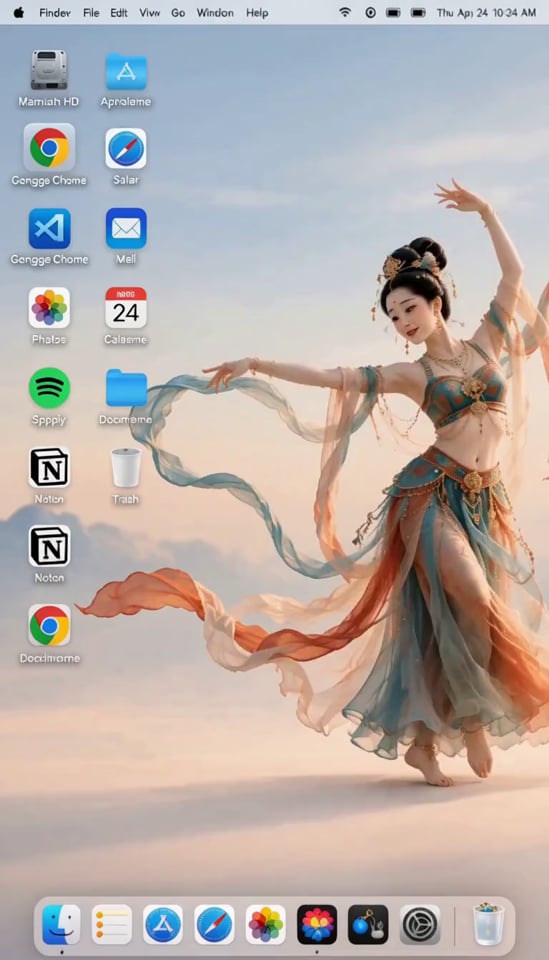
At the beginning, the Dunhuang flying apsara on the right is dancing gracefully. Her movements are elegant and light. As her foot steps down, she accidentally tugs the desktop background like pulling a curtain. The background shakes with a visible ripple.
Because of the shake, all the app icons on the left are jolted loose and fall down onto the bottom of the screen.
The apsara is startled. She immediately stops dancing, covers her mouth with both hands in surprise, looking embarrassed and panicked for a moment.
Then she quickly runs to the left side and hurriedly puts the fallen icons back one by one into their original positions. She is clearly in a rush. Because she is flustered, two of the icons are placed slightly crooked.
After that, she quickly returns to her original position on the right side, recreates her starting dance pose, and forces a slightly awkward smile, pretending everything is fine. A gentle breeze blows, and her clothes and ribbons move softly.
Keep the tone playful and humorous.
Background music: it starts with traditional Dunhuang-style music, then after the accident it changes into a light, funny, playful style.A 16:9 still that mimics a real macOS desktop with a Dunhuang flying apsara on the right, followed by a 10-second video in which her dance shakes the wallpaper, drops the icons, and ends with her hurriedly restoring order.
Video prompts and examplesProduce a short comedic piece that blends the clean look of a Mac desktop with the elegance of a celestial Dunhuang dancer. The prompt's intent is comic contrast: a graceful, traditional figure interacts clumsily with interface elements, resulting in a playful, lighthearted clip suited to social feeds or a lively animated wallpaper concept.
Step 1 — the reference image: use GPT Image 2.5 to generate a 16:9 image that reads as a believable Mac desktop. The background is a soft, classic macOS-style gradient, bright and minimal, with the normal top menu bar and small status icons in its top-right corner. On the left, two neat vertical columns of common app icons, moderately sized with realistic spacing. On the right, a full-body Dunhuang flying apsara in a dancing pose, wearing a flowing traditional costume with long ribbons and light silk scarves drifting slightly in the air. The whole frame should feel like a genuine desktop screenshot, not a poster or collage. Step 2 — the video: feed that image as the starting frame of a roughly 10-second MiniMax H3 video (output format 4:7) with a fixed camera. The dancer performs elegant, light movements; as her foot lands she accidentally tugs the desktop background like a curtain, producing a visible rippling shake. The left-side icons are jolted loose and fall to the bottom of the screen. Startled, she stops, covers her mouth with both hands in embarrassment, then rushes left to put the icons back one by one, leaving two slightly crooked in her haste. She returns to her spot on the right, recreates her opening pose, and forces a slightly awkward smile while a gentle breeze stirs her clothes and ribbons. The music shifts from traditional Dunhuang-style scoring to a light, funny, playful tone after the accident.
The video runs about 10 seconds, which forces a tight pace: the fall, the cleanup, and the return to the opening pose must all fit in that window and can feel rushed. The video model is listed as an estimate, and the output format (4:7) does not match the requested 16:9, so reframing may be required. Faithful reproduction of specific app icons and the precise placement of two crooked icons remain approximate, since such fine details depend on image-to-model consistency.
 SpringWang
 SpringWang
 SpringWang
 SpringWang
 汪三春
汪三春 汪三春
汪三春 SpringWang
 SpringWang
 SpringWang
 SpringWang
 SpringWang
 SpringWangSpringWangMiniMax H3 · estimation
PROMPT
Generate a 16:9 Apple Mac desktop image.

It should look like a real Mac desktop screen, clean and simple, with a classic macOS-style soft gradient background. Keep the overall feeling minimal, bright, and elegant. Include the normal top menu bar and the small status icons in the top-right corner, so it feels like a proper Mac desktop.

On the left side, place two neat vertical columns of common app icons, like normal desktop icons, not too large. Keep them aligned and natural, with realistic spacing.

On the right side, show a full-body Dunhuang flying apsara dancer. She is elegant and beautiful, wearing flowing traditional Dunhuang-style costume with long ribbons and light silk scarves. She is in a dancing pose, graceful and lively. Her clothes and ribbons are floating slightly in the air.

The dancer should stand clearly on the right side, and the two columns of icons should remain on the left side. The whole image should feel like a genuine Mac desktop, not a poster, not a collage, and not an illustration board.Use the reference image as the starting frame.
Create a 16:9 video with a fixed camera. The whole scene is presented like a real Mac desktop.
At the beginning, the Dunhuang flying apsara on the right is dancing gracefully. Her movements are elegant and light. As her foot steps down, she accidentally tugs the desktop background like pulling a curtain. The background shakes with a visible ripple.
Because of the shake, all the app icons on the left are jolted loose and fall down onto the bottom of the screen.
The apsara is startled. She immediately stops dancing, covers her mouth with both hands in surprise, looking embarrassed and panicked for a moment.
Then she quickly runs to the left side and hurriedly puts the fallen icons back one by one into their original positions. She is clearly in a rush. Because she is flustered, two of the icons are placed slightly crooked.
After that, she quickly returns to her original position on the right side, recreates her starting dance pose, and forces a slightly awkward smile, pretending everything is fine. A gentle breeze blows, and her clothes and ribbons move softly.
Keep the tone playful and humorous.
Background music: it starts with traditional Dunhuang-style music, then after the accident it changes into a light, funny, playful style.A 16:9 still that mimics a real macOS desktop with a Dunhuang flying apsara on the right, followed by a 10-second video in which her dance shakes the wallpaper, drops the icons, and ends with her hurriedly restoring order.
Video prompts and examplesProduce a short comedic piece that blends the clean look of a Mac desktop with the elegance of a celestial Dunhuang dancer. The prompt's intent is comic contrast: a graceful, traditional figure interacts clumsily with interface elements, resulting in a playful, lighthearted clip suited to social feeds or a lively animated wallpaper concept.
Step 1 — the reference image: use GPT Image 2.5 to generate a 16:9 image that reads as a believable Mac desktop. The background is a soft, classic macOS-style gradient, bright and minimal, with the normal top menu bar and small status icons in its top-right corner. On the left, two neat vertical columns of common app icons, moderately sized with realistic spacing. On the right, a full-body Dunhuang flying apsara in a dancing pose, wearing a flowing traditional costume with long ribbons and light silk scarves drifting slightly in the air. The whole frame should feel like a genuine desktop screenshot, not a poster or collage. Step 2 — the video: feed that image as the starting frame of a roughly 10-second MiniMax H3 video (output format 4:7) with a fixed camera. The dancer performs elegant, light movements; as her foot lands she accidentally tugs the desktop background like a curtain, producing a visible rippling shake. The left-side icons are jolted loose and fall to the bottom of the screen. Startled, she stops, covers her mouth with both hands in embarrassment, then rushes left to put the icons back one by one, leaving two slightly crooked in her haste. She returns to her spot on the right, recreates her opening pose, and forces a slightly awkward smile while a gentle breeze stirs her clothes and ribbons. The music shifts from traditional Dunhuang-style scoring to a light, funny, playful tone after the accident.
The video runs about 10 seconds, which forces a tight pace: the fall, the cleanup, and the return to the opening pose must all fit in that window and can feel rushed. The video model is listed as an estimate, and the output format (4:7) does not match the requested 16:9, so reframing may be required. Faithful reproduction of specific app icons and the precise placement of two crooked icons remain approximate, since such fine details depend on image-to-model consistency.