A paper boat floating down a forest stream — AI Video Prompt
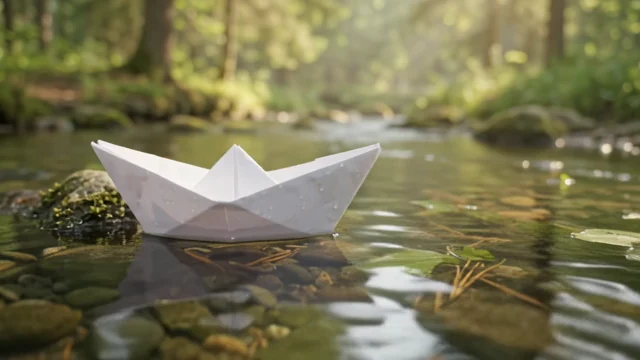
A white folded paper boat drifts on a clear, shallow stream over mossy stones, in a sunlit forest with soft water sounds, filmed as a low cinematic close-up.
What the clip shows and why the short prompt works
A crisp white paper boat sits low on a clear, shallow stream in the center of the frame. Through the water you can see smooth stones and moss, and a mossy rock rises beside the boat. The boat rocks and drifts slowly while small ripples catch the light. Behind it, sunlit tree trunks and green foliage melt into soft bokeh, with haze in the light. The camera stays low, just above the water, in one continuous close-up, and the soundtrack carries a gentle trickle of water. The prompt names a single small subject (a paper boat), one gentle action (floating down a stream), one setting and light (a sunny forest), one sound cue (soft water sounds) and one camera instruction (a cinematic close-up). Asking for sound gives Gemini Omni Flash a reason to add ambient audio, and the close-up keeps the boat large enough to read even at 360p.
How to adapt the method
Swap the object (a leaf, a toy duck, a lantern), the place (a city gutter after rain, a garden pond, snow melt) or the sound (birdsong, distant thunder) and keep one subject, one motion and one sound. Choose 720p or 1080p in Studio for a sharper clip, and 9:16 for vertical social video. Owner-supplied prompt: the exact text used for this output, unchanged.
How to use this prompt
1
Read the complete prompt alongside the result. Identify the subject, framing, lighting and visual style before changing the brief.
2
Open the selected recipe in Studio with its model and starting settings. Check the available version, frame and resolution before generating; a size written in the source prompt is not an output setting or a guarantee.
3
Use the customization fields below to rewrite the brief: Subject / Delivered dimensions / Delivered duration. Keep the composition and other constraints that make this example useful. Check the current credit quote before submitting.
What to check in your result
Watch the entire clip. Compare the main action, camera movement and scene continuity with the brief, and check for changing faces, distorted hands or unexpected cuts. A similar prompt can give a different result; refine the motion rather than assuming an exact copy.