Up to 40% less per creditEligible accounts: 30 signup credits
  • Home
  • Images
  • Videos
  • Agent
  • Prompts
  • Assets
  • Plugins
FilmLune

From real examples to AI image and video creation.

Models

Image models

  • GPT Image
  • Seedream
  • Nano Banana
  • Midjourney
Show moreShow less
  • Grok Imagine Image
  • FLUX Image
  • Qwen Image
  • Recraft

Video models

  • Gemini Omni Flash
  • Kling
  • MiniMax
  • Wan
Show moreShow less
  • Seedance
  • FLUX Video
  • HappyHorse
  • Grok Video
  • Veo

Create

  • Open Studio

Tools & Skills

  • Features
  • MCP server

Resources

  • All resources
  • Changelog

Prompts

  • Explore prompts
  • Image prompts
  • Video prompts

FilmLune

  • Contact
  • Pricing

Community

  • Follow FilmLune on X ↗
  • Join Discord ↗

Legal and privacy

  • Terms
  • Refunds
  • Privacy Policy
  • GDPR
  • CCPA
  • Cookie choices
  • Sharing rules

© FilmLuneKeep creative work and trustworthy information close at hand.

Home
← Back to gallery / Image prompts and examples / Square-format generated image of a tiger

Square-format generated image of a tiger — AI Image Prompt

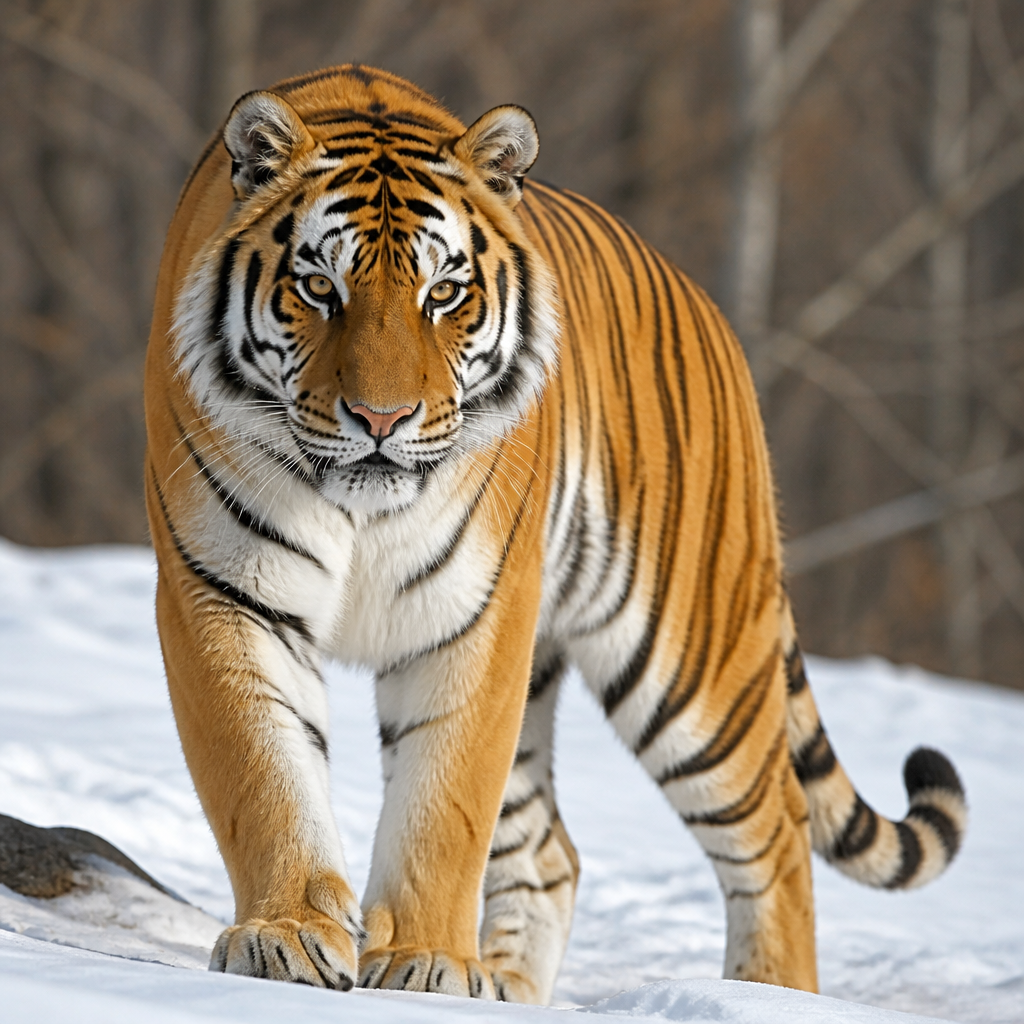
Square-format generated image of a tiger
Avatar of F YF YGPT Image 2

PROMPT
一只老虎

Square-format generated image of a tiger

A minimalist prompt asking simply for "a tiger", generated as a still image in 1:1 format with GPT Image 2. Because the prompt carries almost no direction, the result relies entirely on the model's own interpretation.

Image prompts and examples

When to use this

Produce a tiger image quickly with no constraints on style, setting, or composition. A prompt this short works well as a capability test, a generic visual to refine later, or a starting point for iterating toward a more specific look.

How to recreate it

The generation uses a single phrase: "一只老虎", meaning "a tiger". No pose, background, lighting, or style is specified, so the model decides those elements freely. The 1:1 format produces a balanced square frame suited to social feeds or thumbnails. To reproduce the approach, enter a similarly brief description in GPT Image 2 while keeping the 1:1 ratio, then review the output. To push the result further, enrich the prompt step by step: first specify the tiger's attitude (walking, looking at the camera, resting), then the setting (jungle, snow, studio), and finally the visual treatment (realistic photography, illustration, watercolor).

Practical adjustments

  • Add a style or lighting cue to the prompt to reduce randomness between generations.
  • The square format suits a centered animal subject: place the tiger in the middle of the frame for maximum impact.
  • Generate several variations with the same prompt to compare the model's interpretations before refining.

Limitations

With such a short prompt, pose, setting, lighting mood, and style are uncontrolled and can vary sharply from one render to the next. The 1:1 frame may crop wide environments such as a savanna or an extended forest. No text or brand elements can be added reliably without expanding the prompt.