"You never let her pay" AI recreation: the empty-wallet dinner prank — AI Video Prompt
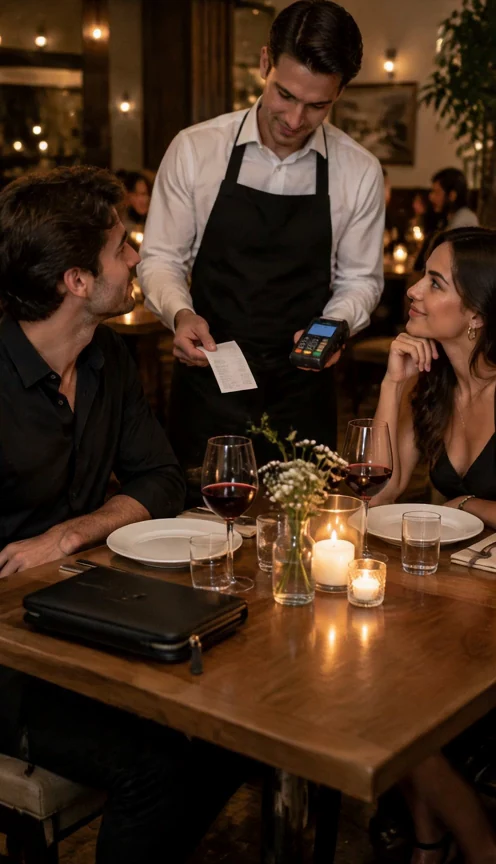
An AI recreation of the "you never let her pay" TikTok trend: at a candlelit dinner, a man stops his date from paying, unzips his own wallet and finds only a kitchen sponge, so the waiter walks him to the sink.
"You never let her pay" is a TikTok trend. The original clip was posted by @boby.biggsjohnson (2026-11-10): the bill arrives, the man proudly stops his date from paying, and his wallet holds nothing but a kitchen sponge, so he ends up washing dishes. In this recreation, a waiter holds out the bill and a card terminal to a couple at a candlelit table. The man raises a hand to stop his date, picks up the large black zippered wallet lying in front of him and unzips it; a close-up looks down into the open wallet, where the only thing inside is a yellow kitchen sponge. He looks up at the camera with a forced grin while the woman covers her mouth, laughing. The waiter puts an arm around his back and walks him into a steel kitchen, to a sink piled with dirty dishes, where he smiles awkwardly at the camera. The opening image already puts the closed wallet on the table in front of the man, so it is clearly his own and the reveal needs no extra setup. The video prompt splits 12 seconds into six two-second beats (the bill, the stop, the unzip and the top-down close-up, the freeze, the walk to the kitchen, the sink full of dishes) and names one concrete prop, a kitchen sponge, so the punchline reads in a single frame. Asking for the same three people and the same restaurant as the start frame keeps the faces and the setting consistent through the one continuous shot.
How to adapt the method
To cast your own characters, upload a photo of two adults at a table as the start frame and keep the video prompt; it works best when a closed wallet sits on the table in front of the man and the bill or a waiter is already in shot. You can also change the step 1 prompt to another setting, such as a café or a food truck, and swap the sponge for another single object. Only use photos of adults (18+) who are not public figures and who agreed to appear in the video. Owner-supplied prompts: the first-frame prompt and the video prompt used for this clip.
How to use this prompt
1
This is an image-to-video recipe. Create the opening image first, then use that output as the input to the video step. Keep the image prompt and motion prompt separate.
2
Open the selected recipe in Studio with its model and starting settings. Check the available version, frame and resolution before generating; a size written in the source prompt is not an output setting or a guarantee.
3
Use the customization fields below to rewrite the brief: Opening frame / Delivered dimensions / Delivered duration. Keep the composition and other constraints that make this example useful. Check the current credit quote before submitting.
What to check in your result
Watch the entire clip. Compare the main action, camera movement and scene continuity with the brief, and check for changing faces, distorted hands or unexpected cuts. A similar prompt can give a different result; refine the motion rather than assuming an exact copy.
Variables to customize
Opening frame
A couple at a candlelit restaurant table, the man's closed zippered wallet on the table, and a waiter holding the bill and a card terminal