Up to 40% less per creditEligible accounts: 30 signup credits
  • Home
  • Agent
  • Images
  • Videos
  • Prompts
  • Assets
  • Plugins

Loading…

FilmLune

From real examples to AI image and video creation.

Models

Image models

  • GPT Image 2
  • GPT Image 2.5
  • Midjourney V8.1
  • Midjourney V8.2
  • Nano Banana Pro
  • FLUX 3 Image
  • Qwen Image 3.0 Pro
  • Seedream 5.0 Lite

Video models

  • Grok Video 1.5
  • MiniMax H3
  • Seedance 2.0
  • Seedance 2.0 Mini
  • Seedance 2.5
  • Dola AI alternative
  • Kling 4.0
  • Wan 3.0
  • Gemini Omni Flash 1.1
  • HappyHorse 1.1
  • FLUX 3 Video
  • MiniMax H3 Max

Create

  • Open Studio

Tools & Skills

  • Features
  • MCP server

Resources

  • All resources
  • Changelog

Prompts

  • Explore prompts
  • Image prompts
  • Video prompts

FilmLune

  • Contact
  • Pricing

Community

  • Follow FilmLune on X ↗
  • Join Discord ↗

Legal and privacy

  • Terms
  • Refunds
  • Privacy Policy
  • GDPR
  • CCPA
  • Cookie choices
  • Sharing rules

© FilmLuneKeep creative work and trustworthy information close at hand.

Home

Loading…

Prompts/AI video prompts/A rusty excavator bucket rises clean from a cleaning tank
1 / 4
esc
1 / 4
FilmLune
Grok Video 1.5

PROMPT

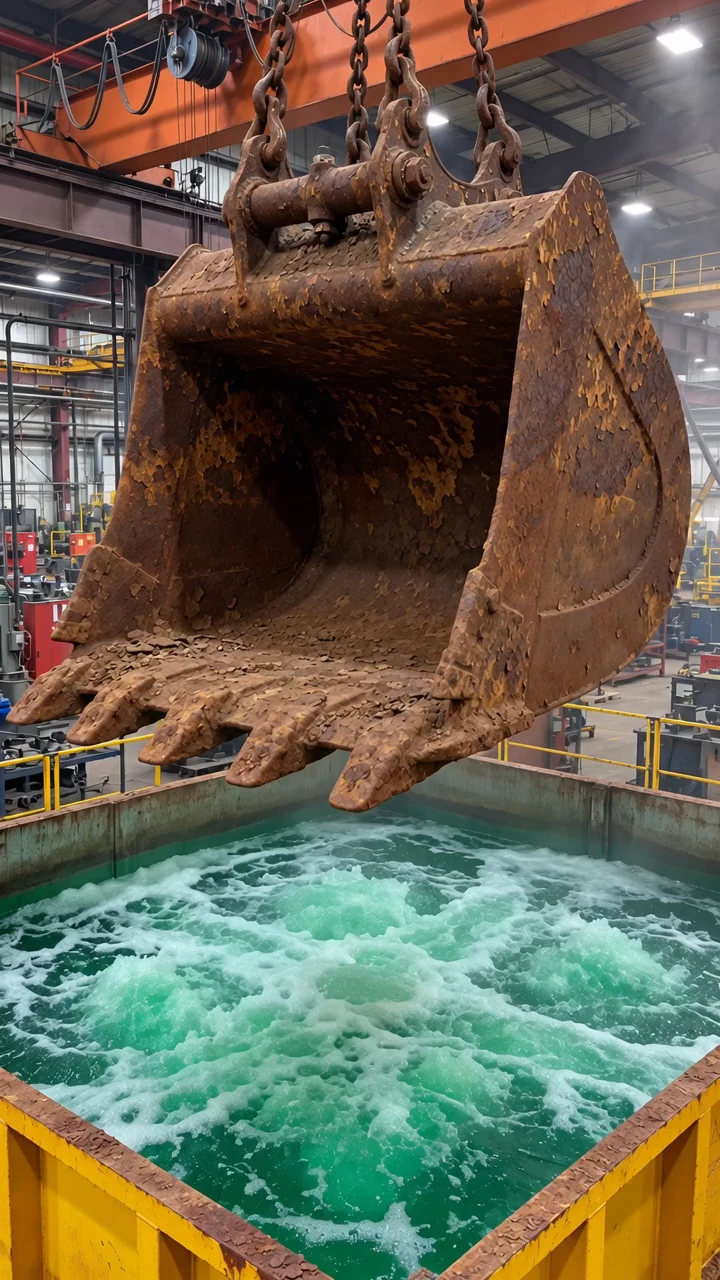
Use case: photorealistic-natural. Create the opening image for a vertical 9:16 image-to-video clip. Create a fresh, photorealistic image with no logos, subtitles, or watermarks. In a real heavy-equipment factory, a gigantic, extremely rusty excavator bucket hangs from several taut thick metal crane chains directly above a large square yellow steel immersion tank. The bucket's wide hollow mouth faces the camera slightly from above; the outside, inside, thick lip, and row of heavy digging teeth are all covered in rough dark reddish-brown rust, caked earth and corrosion. Show it in its ORIGINAL DIRTY STATE, not cleaned or shiny. The entire bucket and its digging teeth remain completely ABOVE the green turbulent water, with a clearly visible small air gap so it can be lowered into the tank later. The entire bucket, the chains from its suspension points, the top opening of the vat and foamy turquoise-green liquid must all be visible together. An orange overhead gantry crane, steel trusses, factory equipment and railings in the background give realistic scale, with natural industrial overhead lighting and small wisps of mist. Single continuous candid smartphone photo, realistic heavy industrial steel geometry and convincing perspective, no people, no duplicate buckets, no transformation already underway, no bubbles covering the bucket, no text or watermark.
Edit this supplied industrial factory video first frame into the MIDDLE keyframe of the same continuous shot, photorealistic vertical 9:16. Preserve the exact same yellow immersion tank, turquoise foaming liquid, factory interior, orange gantry crane, railings, viewpoint, lighting and thick hanging chains. The giant rusty excavator bucket has been lowered ENTIRELY below the water surface and is completely invisible underwater. No piece of the bucket, no bucket teeth, no bucket hinge or brown metal is visible above the surface at all. Only the same taut thick crane chains descend into the middle of the vigorously bubbling liquid; the chains extend naturally beneath the water, they are not detached or cut off in the air. The tank contains turbulent green and rusty brown swirls and soft white foam; the bucket is totally concealed by the opaque liquid. A slightly wider view may reveal the whole tank and the crane hook. This is a believable still from the same real factory video. No people, text, logo, extra machine, debris, second bucket, or change to the setting.
Edit this supplied industrial factory video first frame into the END keyframe of the same continuous shot, photorealistic vertical 9:16. Keep the exact same giant excavator bucket as one single object, the same suspension bar and chains, its wide OPEN HOLLOW MOUTH FACING THE CAMERA, the identical row of heavy digging teeth, same angle and placement above the same yellow immersion tank and same factory interior with orange gantry crane. The entire bucket has just emerged fully above the tank, completely cleaned: replace ALL rust, brown dirt and corrosion on the bucket body, side plates, hinge and teeth with uniform clean satin silver-gray metal, including inside the visible open mouth. The bucket must look like the same exact geometry, not a different object; do not turn its back toward the viewer or close its mouth. Long convincing streams of water drip off the open bucket and teeth into the agitated green-brown water, while the chains remain taut and physically attached. Realistic documentary smartphone photo in a working industrial factory, no people, no text, no logos, no duplicate buckets.

Generate image 1 first, then images 2 and 3 with image 1 as a reference. Upload them to the video step in this order: image 1 (rusty excavator bucket), image 2 (bucket fully submerged), image 3 (clean excavator bucket).

Create one photorealistic, vertical 9:16, 10-second continuous-shot video using the three supplied images in sequence. The first image shows the rusty excavator bucket above the tank. The middle image at 5 seconds shows the bucket completely submerged, with only the chains visible above the water. The final image shows the same bucket lifted out, clean, smooth and silver, with its open mouth facing the camera.

0–5 seconds: The crane lowers the rusty bucket into the bubbling green bath. The teeth enter first, followed by the entire bucket and its top hinge. By 5 seconds, the bucket has completely disappeared beneath the water; the taut chains remain visible.

5–9 seconds: The crane reverses and lifts the same bucket out. Every part emerges already clean, smooth and shiny silver, including the inner cavity, outer sides and teeth. Keep the open mouth facing the camera. Water pours from the bucket back into the tank.

9–10 seconds: Hold the clean bucket above the bath as water drips from it, matching the final image.

Keep the bucket, chains, yellow tank and factory consistent. No cuts, extra buckets or text. Natural crane motor, chains, bubbling water and splashes; no music or dialogue.

Prompt guide · AI video

A rusty excavator bucket rises clean from a cleaning tank — AI Video Prompt

A crane lowers a rust-covered excavator bucket into a bubbling green tank, and the same bucket rises out clean, silver and dripping. The clip is one continuous shot lasting 10 seconds.

  • ModelGrok Video 1.5
  • Use caseSocial media & content
  • StyleIndustrial smartphone documentary
  • CollectionCleaning transformation videos

A before-and-after clean from three ordered reference images

In a factory hall, a large excavator bucket covered in rust and dirt hangs from crane chains above a yellow tank of foaming green water. The crane lowers it teeth first until it disappears completely under the bubbling surface, leaving only the chains visible. The crane then lifts the same bucket out, now clean silver metal inside and out, with its open mouth facing the camera. Water streams from the bucket and its teeth back into the tank as it hangs still at the end. Each reference image fixes one state of the same shot: the rusty excavator bucket above the tank, the bucket hidden under the water, and the clean bucket above the tank. Making images 2 and 3 from image 1 keeps the tank, chains, crane and camera identical. The video prompt times the dip and the lift, keeps the bucket's open mouth toward the camera, and hides the change under the water, so the clean bucket reads as the same object.
How to adapt the method

Replace the bucket and the tank in the three image prompts with another dirty object and cleaning tank, keeping the same setting and camera across all three. Generate images 2 and 3 from image 1, then update the object and timings in the video prompt. For a longer clip, stretch the timed beats and the duration together. Owner-supplied prompts: three reference-image prompts and the video prompt used for this clip.

How to use this prompt

  1. 1

    Generate image 1 first, then images 2 and 3 with image 1 as a reference. Upload them to the video step in this order: image 1 (rusty excavator bucket), image 2 (bucket fully submerged), image 3 (clean excavator bucket).

  2. 2

    Open the selected recipe in Studio with its model and starting settings. Check the available version, frame and resolution before generating; a size written in the source prompt is not an output setting or a guarantee.

  3. 3

    Use the customization fields below to rewrite the brief: Reference images / Delivered dimensions / Delivered duration. Keep the composition and other constraints that make this example useful. Check the current credit quote before submitting.

What to check in your result

Watch the entire clip. Compare the main action, camera movement and scene continuity with the brief, and check for changing faces, distorted hands or unexpected cuts. A similar prompt can give a different result; refine the motion rather than assuming an exact copy.

Review the selected prompt and settings in Studio, then submit when you are ready.

Variables to customize

Reference images
Three ordered images: rusty excavator bucket, bucket fully submerged, clean excavator bucket
Delivered dimensions
720 × 1280
Delivered duration
10.041667s

Source and attribution

This example is attributed to FilmLune.

View the source on the public source

Report a rights or attribution issue

More recipes to explore

View all AI video examples
Portrait performance on a pier at sunsetPortrait performance on a pier at sunsetA plane passenger peels off a wig and a full-head maskA plane passenger peels off a wig and a full-head maskMiniature Cupcake ConstructionMiniature Cupcake ConstructionBackstage Idol VlogBackstage Idol Vlog